
Your needs, this model
Does it fit your priorities?
Can the DS-1730 meet a USB/TWAIN duplex job with a 60-sheet one-load minimum?
The exact U.S. part B11B273201 is listed with USB, one-pass duplex and TWAIN/ISIS; its model guide and specification sheet rate 60 sheets at 80 g/m². The count is per loading and can vary by paper type. Verify the current driver and named capture application for your computer.
Explore this need in the finder →Does it still meet a 70-sheet minimum for one normal ADF load?
Not on the documented 80 g/m² basis: the guide lists 60 sheets at that stack thickness. The separate 3,000-sheet daily-duty figure does not increase the ADF load; use a larger feeder if 70 compatible originals must be loaded together.
Explore this need in the finder →Can the glass handle delicate and mixed-size originals, and is that a manual-feed ADF route?
The guide directs delicate documents, photos, ID cards and booklets to the glass; it also describes scanning several items there and cropping them separately. That separate platen is not a manual-feed setting for the ADF, so the model does not satisfy a requirement for a distinct selected manual-feed route.
Explore this need in the finder →Can this part send a scan to cloud storage without a computer?
No computer-free route is established for B11B273201. Epson's stated online-storage option uses Document Capture installed on a connected Windows PC or Mac and requires internet; confirm that the specific destination and software version remain supported.
Explore this need in the finder →Research-based assessment of the exact Epson U.S. DS-1730, part B11B273201. This is not a hands-on test or a check of a seller's current offer.
A flatbed and a feeder for two different kinds of paper work
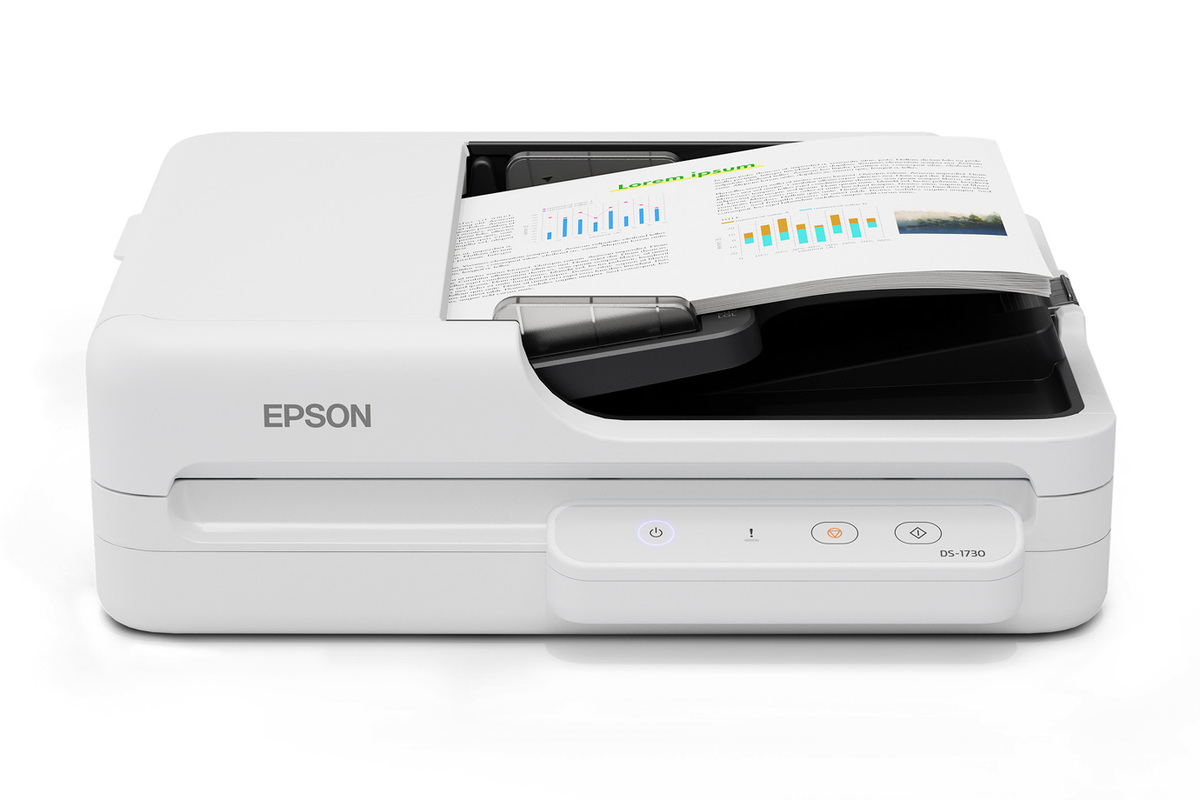
The DS-1730 is not simply a desktop ADF with a glass lid. Its U.S. base configuration pairs a duplex automatic document feeder with a separate flatbed, and Epson's guide describes them as different source methods: the feeder suits stacks and long paper, while the glass is intended for delicate documents, photos, IDs, booklets and originals that should not go through the ADF. That makes the exact model worth considering when a routine mixes ordinary paperwork with a few small, bound or fragile items. It does not mean every original can be fed safely or that the glass creates an extra manual-feed mode.
Epson identifies the U.S. base part as B11B273201. The product sheet specifies USB 2.0, one-pass duplex capture, a 60-sheet ADF at 80 g/m², and TWAIN and ISIS drivers. Those details describe a computer-connected workflow, not a wireless appliance. In the model guide, the scanner button depends on Epson Scan 2 on a connected computer; Document Capture Pro on Windows or Document Capture on Mac can assign a job to that button. The separate platen and feeder are both useful, but their files and operating steps remain part of a host-managed scan routine.
Read the 60-sheet claim as one paper-specific load
The strongest numeric fit is a standard stack of up to 60 sheets at the manufacturer's 80 g/m² basis and below the guide's 6.6 mm stack thickness. Epson warns that loadable capacity varies with paper type. The sheet lists a supported ADF paper-weight range of 50–120 g/m², but that range is not a claim that every thickness or stock can be loaded sixty at a time. The exact original size, stack height and condition matter, especially if the batch mixes formats or includes labels, folds or curled pages.
Epson rates the feeder at up to 30 pages or 60 image sides per minute for Letter-size ADF documents at 200/300 dpi. That is a manufacturer condition, not an independent measurement of a complete job. Page separation, mixed originals, resolution changes, image review, OCR, naming and filing all affect the real time from paper stack to usable records. A separate up-to-3,000-sheet peak daily duty figure is also not the feeder load and not an endurance test; Epson says it is calculated from rated maximum speed and assumed daily use.
Long paper has its own operating limit. The specification sheet lists one long original at a time, up to 120 inches at 300 dpi but 30 inches at 600 dpi, with reduced speed for long scans. Treat that as a special one-sheet path, not a way to extend the regular sixty-sheet stack. If your archive workflow depends on long sheets at high resolution or double-sided output, verify the exact source-specific setting in the current guide before choosing.
The glass handles exceptions, not every difficult document
The flatbed's maximum document size is 8.5 by 11.7 inches, with a stated maximum document thickness of up to 30 mm. The guide also lets the glass scan several separate originals at once and crop them into separate images, which can suit receipts, small forms or photos that would otherwise require individual placements. Keep the platen clean and use the manufacturer's placement instructions; the size and thickness limits still apply, and the feature does not make this an oversize-book scanner.
The ADF guide calls out originals that may not feed successfully, including curled, folded, perforated, coated, carbonless or labelled pages. Some should move to the glass. Epson warns that carbonless paper can damage the rollers, while labels that could lift and delicate originals are better kept off the feeder. The product includes paper-protection behavior that can stop a scan when the sensor detects an error such as a stapled page, but a protective stop is not a promise that a jam or original damage cannot happen. Treat the feeder as a supported path with loading rules, not a universal paper intake.
Those distinctions also answer a common terminology problem: the DS-1730 has an ADF and a flatbed, but the available model documentation does not identify a separate, selected manual-feed inlet or an ADF manual-feed mode. The glass is a different scanning surface, not proof of the questionnaire's distinct manual-feed capability. If you routinely need a dedicated straight or manual feed path for special originals, compare models whose own guides document that mode.
USB and TWAIN are useful, but they do not promise wireless sharing
The DS-1730's listed TWAIN and ISIS standards may help a capture application fit a host-based workflow, but driver names alone do not certify compatibility with a current operating system, third-party application or managed desktop image. Epson's support page is model-specific and asks the visitor to select an operating system. Confirm the exact driver and named application's supported combination with Epson and the software owner before procurement.
Epson describes scan-to-email and online storage through Document Capture installed on a connected Windows PC or Mac, with internet access. That is a computer-mediated destination. The assessed B11B273201 configuration does not document built-in Wi-Fi, Ethernet, direct mobile scanning or a scanner-only cloud path. The separate DS-1760WN B11B274201 is a real alternative when those functions matter: its own U.S. specification documents USB, Wi-Fi, Ethernet, touchscreen and ScanWay network features. It is a distinct model, not a wireless option inferred for the DS-1730. Although both models have a 60-sheet ADF, their network and panel workflows differ; the DS-1760WN's longer 220-inch long-paper statement is not transferred to this model's 120-inch limit.
What to verify before buying this exact configuration
Epson's CPD-65833R1 sheet lists a 16.7 by 13.8 by 5.6 inch body weighing 10.6 pounds. That helps estimate desk footprint, but it does not include clearance for loading or collecting longer originals. The same sheet lists the scanner, Start Here poster, USB 2.0 cable and AC power cable as included items; a specific seller's box can still differ. It states a one-year limited warranty in the U.S. and Canada, subject to its terms, which should not be assumed to cover a used, renewed or third-party offer in the same way.
Before choosing, confirm part B11B273201, the offered unit's condition, return terms and exact package. Match the intended paper size and weight to the ADF table, decide which delicate items belong on the glass, and check the current host driver and TWAIN/ISIS application. If connectivity away from a computer is essential, compare the distinct DS-1760WN or another model with a documented wireless/mobile plan. Published speeds, maximum daily duty and the gallery image are not evidence of independent testing, current stock or the contents of a seller-created bundle.
This assessment uses Epson's exact U.S. product/support records, specification sheet and model guide. No unit was operated or tested, and no independent speed, OCR, reliability, customer-experience, price or availability claim is made.
Key specifications
Key details at a glance
| Scanner class | Flatbed document scanner with duplex ADF |
|---|---|
| Manufacturer-listed simplex rate | 30 ppm |
| Manufacturer-listed duplex image rate | 60 ipm |
| Automatic document feeder capacity | 60 sheets |
| Optical resolution | 1200 dpi |
| Connection options | USB |
| Automatic duplex capture | Yes |
| Separate manual-feed route | No |
| Touchscreen | No |
| TWAIN driver documented | Yes |
Use the exact model’s instructions for operating limits, supplied equipment and version differences.
Sources for this review
Sources for this assessment
- Epson U.S.: DS-1730 flatbed document-scanner category listing
- Epson U.S.: DS-1730 Flatbed Color Duplex Document Scanner with Auto Document Feeder, B11B273201
- Epson U.S. Support: DS-1730, SPT_B11B273201
- Epson DS-1730 Specification Sheet CPD-65833R1, June 2025
- Epson DS-1730 U.S. User's Guide index (NPD7499-01 US)
- Epson DS-1730 U.S. User's Guide: Specifications of Standard Size Originals
- Epson DS-1730 U.S. User's Guide: Types of Originals that Require Attention (ADF)
- Epson DS-1730 U.S. User's Guide: Specifications of Long Paper
- Epson DS-1730 U.S. User's Guide: Capable of Scanning Various Types of Originals
- Epson DS-1730 U.S. User's Guide: Scanning Using a Scanner Button
- Epson DS-1730 U.S. User's Guide: Buttons and Lights
- Epson DS-1730 U.S. User's Guide: Paper Protection
- Epson DS-1730 U.S. User's Guide: Auto Cropping for Multiple Originals
- Epson U.S.: exact DS-1730 official product-gallery image
Compare the workflow before you choose
Use the finder to test your connection, paper and software requirements against the documented scanner arrangements.