
Your needs, this model
Does it fit your priorities?
Does the DS-410 meet a 50-sheet USB/TWAIN duplex requirement?
Epson's exact U.S. model page lists USB, TWAIN/ISIS and one-pass duplex; the DS-410 guide rates 50 Letter sheets at 21 lb (80 g/m²). Check your media mix and the exact current host-driver/application combination before relying on that setup.
Explore this need in the finder →Will it remain a match if a one-load batch needs 60 sheets?
No. The quiz's next selectable minimum, 60 sheets, is above the guide's 50-sheet Letter rating at 21 lb (80 g/m²). The manual lists a different count for each supported paper weight, so do not use the daily-duty number as a feeder capacity.
Explore this need in the finder →Can the base model send a scan to cloud storage without a computer?
No computer-free route is documented for B11B249201. Epson's listed online-service path uses Document Capture on a connected Windows PC or Mac; confirm the current software version and destination requirements.
Explore this need in the finder →Does its special-original handling provide a separate manual-feed path?
No. The DS-410 guide shows special originals entering the same ADF after the page-separation lever is adjusted; some photos or folded originals need an optional carrier sheet. Neither changes the scanner into a separate manual-feed design.
Explore this need in the finder →Research-based assessment of the exact U.S. Epson DS-410, part B11B249201. This is not a hands-on test, a seller-offer check or a promise of current stock.
A compact workgroup path that still depends on a computer
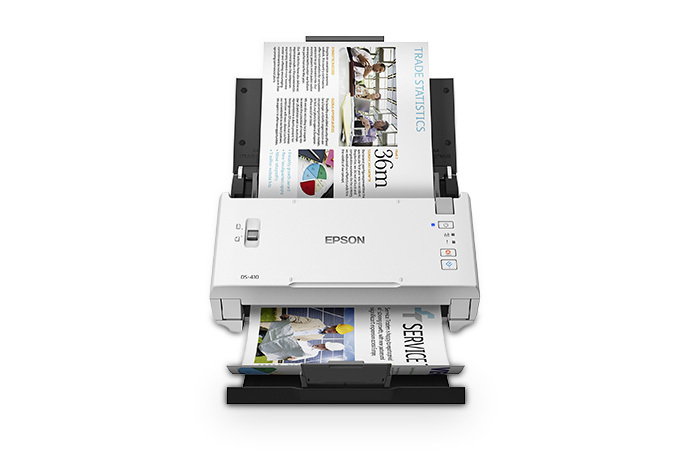
Epson's U.S. product page identifies the DS-410 as part B11B249201 and lists a USB connection, a 50-page automatic document feeder, one-pass duplex capture, and TWAIN and ISIS drivers. Those details point to a straightforward desk routine: load a compatible stack, connect the scanner to a computer, and let the host application create or route the file. They do not establish a phone-first or standalone network workflow. The manufacturer's product and support pages continue to describe this exact part, but a listing is not evidence that a particular reseller has an unopened unit, a complete package or a current offer.
The page rates the DS-410 at up to 26 pages or 52 image sides per minute for Letter originals at 300 dpi in black-and-white, grayscale or color. That is a stated scanner setting, not a measured promise for a full job. Loading, special-paper setup, OCR, destination selection, document naming and verification all take time beyond the feed rate. If your routine depends on a particular capture application, the TWAIN/ISIS listing is useful evidence of driver standards, not proof that every current operating-system and software-version combination works. Use Epson's exact support route and confirm the target application's supported driver with its owner.
The 50-sheet limit is tied to the paper
The guide's familiar 50-sheet figure is for Letter paper at 21 lb (80 g/m²). Epson's loading table lists different per-load counts at other weights: 70 sheets at 13 lb, 30 at 35 lb and 15 at 56 lb, with a note that capacity can vary by paper type. That makes 50 a real numeric boundary for a standard Letter stack, not a guarantee that the same load works with thick, curled, damaged or mixed originals. The separate 3,000-sheet peak daily duty figure describes a manufacturer planning limit calculated from rated speed and assumed use; it cannot be substituted for one-load feeder capacity or an endurance test.
The guide also documents long originals and special media, but each has a procedure. For a long sheet at least 15.5 inches, Epson says to feed one sheet at a time and support it on entry and exit; the maximum is different for one-sided and two-sided long paper. Envelopes, plastic cards, folded pages and carrier-sheet jobs use the same ADF with the page-separation lever adjusted. Some photos, valuable originals and folded large sheets require a compatible optional carrier sheet. For specified special-original routines, the guide says to turn off Double Feed Detection. This flexibility is useful, but it is not a second manual-feed inlet and does not make every original suitable for a regular stack.
Three buttons are not a touchscreen
The manual lists Power, Stop and Start buttons plus indicator lights; it does not describe a screen. Pressing Start can run the scan job assigned in Document Capture Pro on Windows or Document Capture on Mac, provided the scanner is connected to that computer and the required software is installed. Epson also advertises up to 30 user-programmable jobs in its software. That arrangement can simplify a known, repeated desk workflow, but staff should not expect to browse touchscreen profiles on the scanner itself.
Epson lists online-storage destinations and searchable-file workflows, but its U.S. product-page note ties cloud storage to Document Capture installed on a connected Windows PC or Mac. The guide's cloud instructions likewise begin in Document Capture Pro. Treat this as computer-mediated scanning, not a built-in Wi-Fi or computer-free cloud route. If wireless placement, mobile scanning or an appliance-style destination panel is essential, shortlist a model whose exact base configuration documents those routes rather than inferring them from the word “cloud.”
Where it sits beside more capable alternatives
The DS-410 makes sense when a 50-sheet, one-pass duplex USB feeder and an established TWAIN/ISIS application matter more than network features or a large stack. A different design may be better for another constraint: Epson's DS-730N is a wired USB/Ethernet model with a published 100-sheet feeder, while an exact model such as that one still requires its own host and paper-condition checks. The comparison is not a speed test or a claim that an extra interface makes software compatible; it is a reminder to distinguish the DS-410's simpler base route from a scanner built for shared-network use.
For routine documents, the DS-410's supported stack capacity and speed setting may be enough. For high-value originals, photographs, fragile pages or unusual stocks, assess the manufacturer loading table first and budget for any required carrier sheets. The 11.7 × 6 × 6.1 inch body and 5.5 lb listed weight describe a small desktop footprint, but they do not say how much clearance your desk needs for the input and output trays or longer sheets.
Checks before you choose this configuration
Match the exact U.S. part B11B249201 rather than relying on the family name alone. Confirm the current box contents, cable and power supply, unit condition, return terms and any warranty that applies to the specific offer. If 50 sheets is a hard minimum, compare the paper weight and original sizes you actually expect to load against the manual; move to a higher-capacity model when your normal stock needs more. Verify the current Epson driver, operating system and named TWAIN/ISIS application before procurement, and decide whether cloud work may be performed on a connected computer. The manufacturer lists a three-year limited warranty with Advance Exchange, subject to its terms; that statement does not verify coverage for any individual used, renewed or third-party-sold unit.
This assessment uses Epson's U.S. product/support information and the DS-410 guide. No unit was operated or tested for this review, and no independent performance, customer-experience, price or availability claim is made.
Key specifications
Key details at a glance
| Scanner class | Desktop sheet fed document scanner |
|---|---|
| Manufacturer-listed simplex rate | 26 ppm |
| Manufacturer-listed duplex image rate | 52 ipm |
| Automatic document feeder capacity | 50 sheets |
| Optical resolution | 600 dpi |
| Connection options | USB |
| Automatic duplex capture | Yes |
| Separate manual-feed route | No |
| Touchscreen | No |
| TWAIN driver documented | Yes |
Use the exact model’s instructions for operating limits, supplied equipment and version differences.
Sources for this review
Sources for this assessment
Compare the workflow before you choose
Use the finder to test your connection, paper and software requirements against the documented scanner arrangements.