
Your needs, this model
Does it fit your priorities?
Can the DS-790WN scan to a cloud service without a computer?
Epson documents ScanWay panel scanning to supported online-storage services without a computer, but the route requires the configured network, Internet access and Epson Connect activation/account. Smart Panel is a separate phone-led route, and the guide limits some originals in that app.
Explore this need in the finder →Can I load 100 sheets for every paper job?
Epson's guide lists 100 Letter sheets at 21 lb (80 g/m²), but 80 legal sheets and progressively smaller loads for heavier stock; choose capacity by the exact size and weight, not just the headline number.
Explore this need in the finder →Does it have a separate manual-feed route for a fragile or unusual original?
The reviewed guide does not document a separately selected Manual Feed path. It documents ADF single-sheet Automatic Feeding Mode and special procedures with optional carrier sheets; do not feed photos or valuable originals directly or treat those options as a second feeder.
Explore this need in the finder →Evidence-led assessment of Epson's exact U.S. DS-790WN, part B11B265201. This is not a hands-on test and does not establish a particular retailer's stock, price, package condition or host-software compatibility.
A networked desktop scanner, not a portable one-sheet model
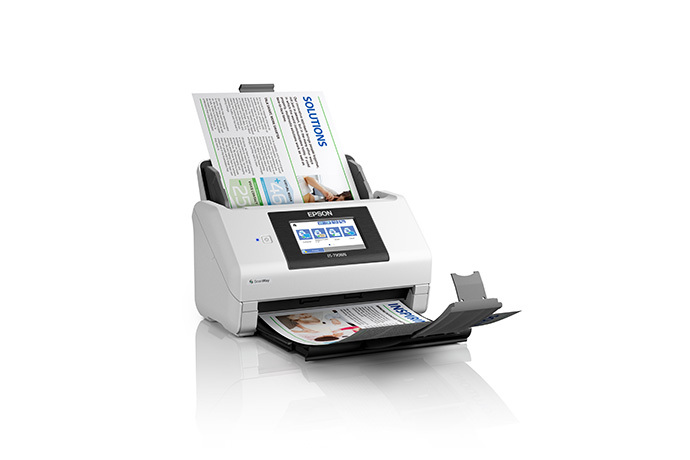
The DS-790WN is a full-size, sheet-fed duplex scanner with three built-in ways to connect: USB to a host computer, wired Ethernet, and Wi-Fi. The U.S. specification lists a 4.3-inch color touchscreen with up to 30 user-defined scan jobs, alongside TWAIN and ISIS driver support. That puts it in a different workflow class from Epson's one-sheet DS-70 and DS-80W. It can serve a shared office as well as a nearby workstation, but those routes still need deliberate setup. A listed driver is not proof that the current version works with every operating system, capture app or locked-down network; check the exact B11B265201 support downloads and the software maker's requirements before ordering.
Epson's U.S. record lists a three-year limited warranty, but that is not a substitute for confirming a seller's exact part, purchase-date eligibility and service terms. The review covers the standard scanner model only. A card reader, carrier sheets, seller bundle or current offer is not presumed included.
One-pass duplex at a stated rate—with different high-resolution numbers
For office batches, the 100-sheet ADF and one-pass capture of both sides are the headline capabilities. Epson rates the DS-790WN up to 45 pages and 90 images per minute on Letter originals at 200 or 300 dpi over USB. The same product sheet lists 12 ppm and 24 ipm at 400 or 600 dpi. Those are manufacturer's figures under stated conditions—not an independent speed test, a network guarantee, or the time needed to review OCR and file a real batch.
Capacity also depends on what is being loaded. The model guide rates a Letter stack at 100 sheets of 21 lb (80 g/m²) paper, but lists 80 legal sheets at that basis and lowers the load allowance as paper gets heavier. It gives additional size, thickness and handling instructions for cards and other originals. Treat 100 as a per-loading figure for the stated stock, not as an all-paper promise or a daily-volume rating. Epson's separate 7,000-sheet peak daily figure is calculated from rated speed and an assumed amount of use; the company says network conditions affect speed. It is not an endurance test or a substitute for matching the work to the manufacturer's guidance.
Host capture, ScanWay and phone scanning are not the same route
A USB-connected workstation can use Epson's listed TWAIN/ISIS path or Epson capture software. On the scanner itself, ScanWay can send to supported USB storage, network folders, email or online services without a computer. That is useful for repetitive destinations, but the setup is not magic: network folders and email need working network settings, and Epson Connect activation, an account and Internet access apply to supported cloud services. An organization's approved service list and credentials matter as much as the scanner feature list.
For a compatible iOS or Android device, Epson Smart Panel provides another wireless capture path. The manual has a useful boundary: Smart Panel does not support carrier-sheet scans or originals 15.5 inches or longer. Some panel destinations also have shorter long-paper limits than a computer capture job. Do not infer that a phone, a scanner's touchscreen and direct cloud delivery all share identical capabilities just because they use Wi-Fi. Check the target device, app version, service account and original size before building a workflow around them.
Special originals need a supported loading method
The DS-790WN does not have a separate manual-feed path or a flatbed. The user guide calls out an Automatic Feeding Mode for feeding individual pages as the scan proceeds; that is not a second manual-feed inlet. Epson provides model-specific procedures for cards, folded originals and material that needs a carrier sheet, but carrier sheets are separate accessories. The manual cautions against putting photos or valuable artwork directly into the ADF and says those originals need the supported protective procedure. Confirm the exact original's size and condition instead of assuming the feeder's broad paper-weight range makes every item safe.
Long pages also depend on how they are captured. Epson lists up to 240 inches at 200 dpi and 215 inches at 300 dpi, but the panel's network/email/cloud destinations can have lower limits, and Smart Panel excludes very long originals. Check the table for the actual destination, not just the maximum printed on a specification page. The listed roller kit rating is a replacement-planning detail, not a promise of service life; paper condition, cleaning and use affect upkeep.
Where the 790WN sits beside the newer EdgeLink models
The DS-790WN shares a 100-sheet capacity and network/TWAIN concept with the DS-800WN and DS-900WN, but Epson's sheets rate it at 45/90 rather than 50/100 or 70/140, with a 7,000-sheet peak rather than 8,000 or 11,000. The newer pair is branded EdgeLink for direct touchscreen integrations with supported third-party systems; verify that your chosen platform is actually supported and whether it requires a separate license. Those successors do not add ADF capacity, so a larger batch still needs reloads. If the main goal is a phone-only portable scanner, all three are more machine than the one-sheet DS-80W; if the main goal is a separate glass platen or manual-feed mode, the 790WN is not the answer either.
Consider this model when a 100-sheet load, duplex capture, touch-panel jobs and flexible host/network routes fit an existing document process. Before buying, verify B11B265201, the current driver and app versions, the supported destination, paper loading rules, exact package contents, account requirements and purchase-date warranty terms. The published speed and duty figures are useful comparison points, not promises of tested performance.
Key specifications
Key details at a glance
| Scanner class | Professional desktop sheet-fed scanner |
|---|---|
| Manufacturer-listed simplex rate | 45 ppm |
| Manufacturer-listed duplex image rate | 90 ipm |
| Automatic document feeder capacity | 100 sheets |
| Optical resolution | 600 dpi |
| Connection options | USB / Ethernet / Wi-Fi |
| Automatic duplex capture | Yes |
| Separate manual-feed route | No |
| Touchscreen | Yes |
| TWAIN driver documented | Yes |
Use the exact model’s instructions for operating limits, supplied equipment and version differences.
Sources for this review
Sources for this assessment
Compare the workflow before you choose
Use the finder to test your connection, paper and software requirements against the documented scanner arrangements.