
Your needs, this model
Does it fit your priorities?
Can the ES-580W send a scan to a cloud destination without a computer attached?
Yes, the touchscreen Cloud path can send to a destination previously registered with Epson Connect. Configure the scanner's network and register the destination first; check that the exact service is currently supported. This is not a setup-free or universal cloud promise.
Explore this need in the finder →Does the 100-sheet ADF mean it will load 100 of my documents?
The manual lists 100 Letter sheets at 80 g/m², but only 86 at 90 g/m², 74 at 104 g/m² and 80 Legal sheets at 80 g/m². Use the manual's stock and stack table for the actual batch; the published figure is a per-load maximum, not a daily capacity.
Explore this need in the finder →Is it compatible with both a computer and mobile scanning?
Epson documents USB-to-computer and Wi-Fi options, plus Smart Panel scanning from compatible iOS or Android devices. The mobile route is not the USB host route and excludes carrier sheets and originals 15.5 inches or longer; confirm the exact app, device and network before relying on it.
Explore this need in the finder →Can I feed occasional special originals through a separate manual-feed path?
The inspected ES-580W materials document the ADF and model-specific special-original/carrier-sheet rules, but do not establish a separate manual-feed inlet. Do not count an optional carrier sheet or one-at-a-time use of the ADF as a bypass; check the exact original in the manual.
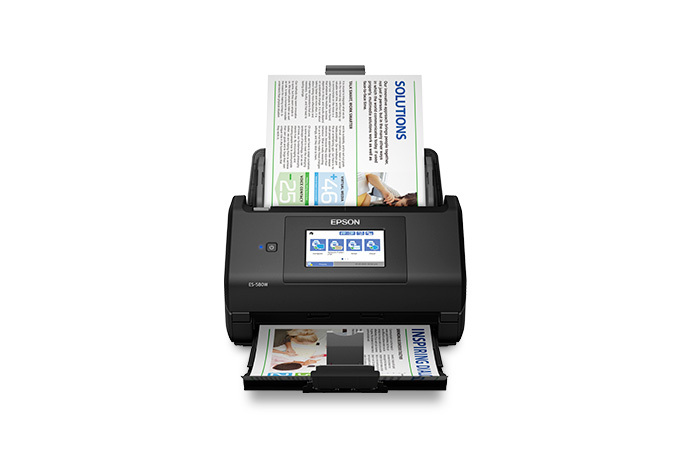
Explore this need in the finder →The Epson WorkForce ES-580W is a desk-based, sheet-fed duplex scanner, U.S. model B11B258201. Its published feature mix is unusually broad for a document feeder: USB and Wi-Fi setups, a 4.3-inch touchscreen, Smart Panel phone scanning, a listed TWAIN driver and panel destinations for registered cloud services or compatible USB memory. This is a source-based assessment of the documented routes and limits, not a hands-on test; I make no claim about measured speed, image quality or reliability.
What the feature combination actually buys
The key distinction is that the ES-580W offers several different ways to start and finish a scan, rather than one universal wireless workflow. A computer can use the USB connection; the scanner can also be configured on Wi-Fi. Epson's manual describes Smart Panel scanning from a network-connected unit to compatible iOS or Android devices. Separately, the touchscreen's Cloud destination can send to an address registered through Epson Connect without a computer attached at the moment of scanning. The panel can also save directly to USB memory. These routes make the scanner flexible for a shared desk, but each has its own network, account, host-software or storage requirements.
Epson lists TWAIN compatibility, which matters if a particular capture or records program requires that interface rather than a PDF exported from bundled software. That label is not a promise that the scanner works with every operating system, TWAIN version or third-party program. Confirm the exact current driver and application requirements before buying, especially in a managed office.
Read the 100-sheet figure as a loading limit
The product page advertises a 100-sheet automatic document feeder and one-pass two-sided scanning. The detailed guide qualifies the headline: 100 Letter sheets are listed at 80 g/m², while the table drops to 86 at 90 g/m² and 74 at 104 g/m². At the same 80 g/m² basis, Legal paper is listed at 80 sheets. Still heavier Letter stock has still lower counts. Capacity can also vary with paper type and stacking; it is a per-load specification, not a daily workload rating or a guarantee for a mixed batch.
Epson's maximum speed is 35 pages per minute / 70 images per minute under its stated Letter, 300-dpi black-and-white, grayscale or color conditions. That figure is useful for comparing manufacturer specifications, but not a measured end-to-end result. Sorting, double-feed checks, resolution, document condition, processing and the selected destination all affect how long a real job takes.
Special originals and long pages need a separate check
This is a feeder, not a flatbed. Epson gives separate instructions for envelopes, cards, long sheets, folded originals and carrier-sheet jobs. A carrier sheet is an accessory procedure, not proof that one is included. Epson also warns that document scanning may not preserve a photo's color as well as a flatbed. Unusually textured, wrinkled, perforated, labelled, carbonless, curled or coated originals need extra care and may be unsuitable for direct feeding.
The 240-inch maximum applies only to one long original under particular routes and resolutions. The guide allows the full length for computer or control-panel-to-computer scans at 50–200 dpi, up to 215 inches at 201–300 dpi and 53 inches at 301–600 dpi. Direct panel destinations have shorter limits, and some paths do not support long paper at all. Smart Panel is narrower still: Epson says the app does not handle carrier sheets or originals 15.5 inches and longer.
I did not find evidence for a separate manual-feed inlet on this exact model. The model page and inspected guide describe the ADF and special-original procedures, but that is not enough to count the scanner as having a distinct bypass. If an occasional card or delicate original is your deciding use, check the exact media instructions and decide whether the optional carrier-sheet route is acceptable; do not assume it is the same as a dedicated manual feed.
Where this model sits among Epson's desktop choices
The ES-580W is not interchangeable with the ES-590W, ES-500W II or RapidReceipt RR-600W. Its own U.S. SKU and support key should be matched to any offer. In the reviewed Epson specifications, ES-580W is rated at 35/70 ppm/ipm; the separately assessed ES-590W is rated at 45/90. Both are distinct 100-sheet desktop scanners, but the speed difference is a maker-rated comparison, not a prediction of job completion. The ES-590W review discusses that model's own loading and software conditions. Because the ES-580W guide is shared with RR-600W, receipt-specific functions of the RapidReceipt model are not assumed here.
Base box and Certified ReNew are not the same package claim
For base part B11B258201, Epson's product page lists the scanner, Start Here poster, SuperSpeed USB cable, AC adapter and power cable. The separately observed Certified ReNew offer uses suffix B11B258201-N. Its captured U.S. page displayed one-year limited-warranty, 30-day-return and free-shipping badges, but did not give a full renewed-carton checklist or cosmetic grade. Those page-level terms should be checked on the exact offer, and the base page's box list should not be transferred to the renewed unit. Neither listing state is a promise of current availability.
Consider the ES-580W if you want a desktop feeder with both wired and wireless setup choices, an on-device touchscreen, a documented phone route, TWAIN and a registered computer-free cloud destination—and your ordinary batches fit the paper-weight table. Look elsewhere or verify first if you need a flatbed, a guaranteed 100-sheet load of heavier or Legal stock, long originals from a mobile app, universal host compatibility, or a documented separate manual-feed path. Check the exact U.S. part and package before ordering.
Key specifications
Key details at a glance
| Scanner class | Desktop sheet fed document scanner |
|---|---|
| Manufacturer-listed simplex rate | 35 ppm |
| Manufacturer-listed duplex image rate | 70 ipm |
| Automatic document feeder capacity | 100 sheets |
| Optical resolution | 600 dpi |
| Connection options | USB / Wi-Fi |
| Automatic duplex capture | Yes |
| Touchscreen | Yes |
| TWAIN driver documented | Yes |
Use the exact model’s instructions for operating limits, supplied equipment and version differences.
Sources for this review
Sources for this assessment
- Epson U.S.: WorkForce ES-580W Wireless Duplex Touchscreen Desktop Document Scanner
- Epson U.S. Support: WorkForce ES-580W
- Epson ES-580W/RR-600W User's Guide: contents and scope
- Epson ES-580W/RR-600W User's Guide: General Specifications
- Epson ES-580W/RR-600W User's Guide: Original Document Specifications
- Epson ES-580W/RR-600W User's Guide: Special Original Specifications
- Epson ES-580W/RR-600W User's Guide: Scanning to the Cloud
- Epson ES-580W/RR-600W User's Guide: Scanning to an External USB Device
- Epson ES-580W/RR-600W User's Guide: Starting a Scan from a Smartphone or Tablet
- Epson ES-580W/RR-600W User's Guide: Existing Wi-Fi Network Setup
- Epson U.S.: ES-580W Certified ReNew offer, part B11B258201-N
Compare the workflow before you choose
Use the finder to test your connection, paper and software requirements against the documented scanner arrangements.