
Your needs, this model
Does it fit your priorities?
Can the FF-680W scan ordinary documents, or is it only for photographs?
Epson provides separate software routes: FastFoto for photos, ScanSmart with OCR for documents, and the DocumentScan app for documents on iOS/Android over direct Wi-Fi. The doc app does not scan photos; check the exact supported original sizes and media restrictions before using it.
Explore this need in the finder →Is two-sided document capture automatic?
Yes. Epson identifies the FF-680W as a one-pass duplex color sheet-fed scanner, so both sides of supported documents are captured in one feed. It is not a promise for fragile, glossy, wet-ink or otherwise excluded originals.
Explore this need in the finder →Does its advertised 100-sheet ADF mean I can load 100 typical sheets?
Although Epson's product page and general specification say 100 sheets, the more detailed Letter-paper loading table lists 80 at 21 lb and 100 only at 10 lb. The matcher therefore uses the conservative 80-sheet standard-paper basis; check the current guide and exact stock before relying on a larger load.
Explore this need in the finder →Can it send documents to cloud storage without a computer?
That is not established. Epson documents scan-to-cloud through FastFoto or ScanSmart installed on a connected Windows PC or Mac, while the documented direct-Wi-Fi DocumentScan app sends document scans to a compatible iOS/Android device. The reviewed sources do not establish cloud sending from that app without a computer.
Explore this need in the finder →The Epson FastFoto FF-680W is marketed first as a personal photo scanner, but it has a real, separately documented workflow for paper documents. That distinction makes it more interesting than an ordinary photo-only device—and also means a buyer has to think about two applications, different loading instructions and two kinds of speed claim. This assessment uses Epson's U.S. product page, support material and model guide; it is not a hands-on test, ownership report or independent speed measurement.
A photo-first machine with a separate document role
The core mechanism is a sheet-fed, one-pass duplex color scanner with 600 dpi optical resolution. Epson's FastFoto application is intended for photographs: the product page highlights restoration, organization and sharing, and Epson specifies a maximum batch of up to 36 prints in common 3.5-by-5, 4-by-6 or 5-by-7-inch sizes. Larger 8-by-10 prints, Polaroids and long panoramas have smaller batch limits. Epson's advertised “one photo per second” figure is for a landscape 4-by-6 original at 300 dpi; it should not be read as a promise for every photo size, resolution or finished file.
For paper, Epson points to ScanSmart rather than FastFoto. It lists OCR and document scanning up to 45 pages/90 images per minute at 300 dpi, a manufacturer-rated condition rather than an independently measured throughput. Epson's guide supports longer document capture, but the maximum changes with resolution: up to 240 inches at 200 dpi, 214 inches at 300 dpi and 15.5 inches at 600 dpi. Long originals therefore require a suitable host/software setup and careful physical support; the headline length is not an all-resolution guarantee. See the exact FF-680W U.S. product page and model guide before assigning the scanner to unusually long, valuable or delicate documents.
Three distinct ways the software participates
A computer can control the document workflow over USB or Wi-Fi using Epson ScanSmart; Epson also describes host-based cloud sending through FastFoto or ScanSmart installed on a connected Windows PC or Mac. The guide separately documents Epson DocumentScan for scanning documents from the network scanner to an iOS or Android device over direct Wi-Fi. Its note is unusually important: DocumentScan scans documents, not photographs. The phone app is not the same workflow as FastFoto's mobile photo tools, and Epson's inspected material does not establish cloud upload from DocumentScan without a computer. Confirm current app availability, host operating-system support, account requirements and the destination you need.
USB and Wi-Fi are documented connection options, not proof that two computers can run unrelated jobs at once. The guide's setup and troubleshooting notes describe network scanning and also warn that a scanner connected to one host by USB and another by wireless may route a press of the physical scan button to the USB-connected computer. A computer-free destination touchscreen is not part of the documented design: the controls are physical buttons and lights, while software selection happens on a host or mobile device. Epson's FF-680W support FAQ discusses selecting the scanner as a source in a TWAIN-compliant program, but that is not a guarantee for every third-party application or OS version.
Check the paper rating before counting on a full stack
The most consequential spec ambiguity is the feeder rating. Epson's product page calls it a 100-page ADF and its general specification also lists 100 sheets at 21 lb. However, the detailed document-loading table in the FF-680W guide says a Letter-paper load is 100 sheets at 10 lb, 80 at 21 lb and 18 at 110 lb. Because the operational loading table is the more specific guidance for a paper batch, the questionnaire uses 80 sheets as a conservative 21-pound threshold and does not count the scanner as a 90- or 100-sheet standard-stock match. That is an evidence-handling choice, not a claim that the conflicting 100-sheet specification has disappeared. Check the current guide and your paper weight; leave a capacity margin if restarting the feeder would interrupt important work.
The remaining feed rules are similarly specific. Epson separates photo loading (faceup) from document loading (facedown). The manual describes different limits for standard paper, business cards, plastic cards and photos; some large, folded, irregular or delicate originals require a carrier sheet and one-at-a-time handling. Those instructions still use the ordinary input tray. They do not amount to a second manual-feed path or permission to run every odd original through the ADF. Epson warns against direct feeding of thermal, coated, glossy or wet-ink pages, labels, curled or torn documents, bound material and other listed media. For unusually valuable family photographs, the ADF itself may be the wrong handling method even though FastFoto is designed for batch-photo capture.
Who should compare it—and who should look elsewhere?
The FF-680W is plausible when a household is digitizing a photo collection and also needs a capable duplex path for tax papers, letters, receipts or other supported documents. It combines USB and wireless choices, OCR-capable desktop software and a direct-Wi-Fi mobile document route, without requiring that the photo software do every job. Its 11.7-by-6.7-by-6.9-inch body is larger than a portable scanner, and the trays need extra operating clearance. The device is also more specialized than a straightforward office document scanner: the photo and document workflows use different applications, and the capacity discrepancy calls for a stock-specific check.
If routine office stacks matter more than photographs, compare the Epson WorkForce ES-500W II assessment as a document-first alternative. Epson rates that model at 35 ppm/70 ipm and gives it a 50-sheet feeder; its own host, phone-app and paper limits still need checking, but it avoids making photo restoration the center of the purchase. If the FF-680W's special-original limits, app separation or ADF ambiguity do not fit the work, a conventional desktop document scanner may be a better match than stretching this hybrid's photo-focused design into a duty cycle Epson has not specified.
Certified ReNew is an offer condition, not another scanner review
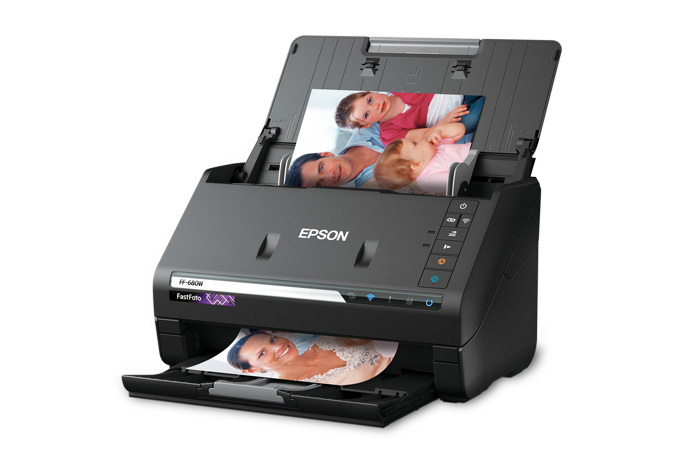
Epson separately lists a Certified ReNew offer as part B11B237201-N. Its exact page identifies the FF-680W and displays a one-year limited warranty and 30-day return-policy badges; verify those terms on the current offer and read their exclusions before ordering. The offer page does not provide a complete carton checklist or a cosmetic-condition grade. Do not assume that a new retail package, every accessory or the base page's terms automatically transfer to this suffix. The photograph above is Epson's product-page image of the FF-680W scanner body and staged photos; it does not show a renewed unit or its box. See the exact Certified ReNew listing for the dated offer details, and confirm the precise part, supplied items and current policy for whichever listing you consider.
Sources checked: Epson's exact U.S. base-model page, the FF-680W support route, model user guide and FAQs, plus the exact Certified ReNew offer page. Specifications above are attributed to Epson; no product was physically tested and no present price, stock, customer experience or independent performance result is claimed.
Key specifications
Key details at a glance
| Scanner class | Photo document sheet fed duplex scanner |
|---|---|
| Manufacturer-listed simplex rate | 45 ppm |
| Manufacturer-listed duplex image rate | 90 ipm |
| Automatic document feeder capacity | 80 sheets |
| Optical resolution | 600 dpi |
| Connection options | USB / Wi-Fi |
| Automatic duplex capture | Yes |
| Separate manual-feed route | No |
| Touchscreen | No |
| TWAIN driver documented | Yes |
Use the exact model’s instructions for operating limits, supplied equipment and version differences.
Sources for this review
Sources for this assessment
- Epson U.S. FastFoto FF-680W product page, B11B237201
- Epson FF-680W U.S. User's Guide, selected English sections
- Epson U.S. FF-680W support page, SPT_B11B237201
- Epson FF-680W FAQ: supported document sizes and media restrictions
- Epson FF-680W User's Guide: DocumentScan and ScanSmart document routes
- Epson FF-680W software troubleshooting FAQ for TWAIN-compliant programs
- Epson U.S. FastFoto FF-680W Certified ReNew offer, B11B237201-N
- Epson Certified ReNew program announcement
- Epson FF-680W product-page gallery image, front angled scanner view
Compare the workflow before you choose
Use the finder to test your connection, paper and software requirements against the documented scanner arrangements.