
Your needs, this model
Does it fit your priorities?
Can I scan from a phone or tablet over Wi-Fi?
Yes. Epson documents Smart Panel for compatible iOS and Android devices, using the scanner's Wi-Fi network or direct Wi-Fi. The app does not support carrier sheets or originals 15.5 inches (393.8 mm) and longer, so confirm the mobile route against the documents you actually scan.
Explore this need in the finder →Does Wi-Fi let it upload to cloud storage without a computer?
That is not established for the ES-500W II. Epson's product note assigns cloud upload to ScanSmart installed on a connected Windows PC or Mac, and the guide's cloud-send steps use that host software and account login. Phone scanning is documented separately; do not treat it as a built-in scanner-to-cloud destination.
Explore this need in the finder →What does the 50-sheet feeder rating mean for my stack?
The English guide lists 50 sheets at 21 lb (80 g/m²), then 43 at 24 lb (90 g/m²) and 37 at 28 lb (104 g/m²); other weights and unusual originals have their own lower limits or loading rules. Treat the figure as one paper-specific ADF loading, not mixed-stack throughput or pages per day.
Explore this need in the finder →Can it keep USB and Wi-Fi active together for two simultaneous setups?
Epson's guide cautions that USB and network connections cannot be used at the same time. The two choices make the ES-500W II different from the USB-only ES-400 II, but do not assume concurrent parallel scan jobs; confirm the intended host and connection behavior in the current guide.
Explore this need in the finder →A 50-sheet desktop feeder with a real wireless branch
The U.S. WorkForce ES-500W II (model B11B263201) is a sheet-fed desktop scanner with both a computer workflow and a wireless option. Epson lists USB, Wi-Fi, a 50-sheet automatic document feeder, single-pass two-sided capture and an included TWAIN driver. That combination can suit a home office or small team that batches paper but also wants network placement or phone scanning. Its maximum 35 pages per minute/70 images per minute rating is based on letter originals at 300 dpi in black-and-white, grayscale or color—a manufacturer figure, not an independent test or every-route promise.
USB and Wi-Fi are choices, not a promise of parallel scanning
The ES-500W II is a meaningful step beyond the USB-only ES-400 II when network placement or a phone/tablet route matters. Both share a 50-sheet feeder and 35/70 rated speed class, but only the W model has documented Wi-Fi and Smart Panel. Epson's combined guide cautions that USB and network connections cannot be used at the same time; treat them as different setup choices, not simultaneous parallel scan jobs. It also notes which computer receives a scan-button job if a USB-connected and wireless-connected computer are configured, so confirm that behavior before planning a handoff routine.
The Wi-Fi specification is 2.4 GHz IEEE 802.11 b/g/n. A phone app and networked computer still depend on compatible software, network policy and device support; wireless hardware alone does not guarantee a managed-office connection.
Mobile capture works, with narrower document limits
Epson identifies Smart Panel for iOS and Android, and the manual describes starting scans from a phone or tablet. This can move routine paperwork into a mobile-device workflow. It differs from the physical start button, which opens Epson ScanSmart on a computer. Smart Panel has narrower media limits: the guide excludes carrier-sheet scanning and originals 15.5 inches (393.8 mm) or longer. If you often scan long receipts or fragile originals, check whether the computer route supports the work instead of assuming the app covers every document.
Cloud upload still belongs to the host-software workflow
Epson's product copy mentions cloud storage, but its footnote draws an important boundary: scanning wirelessly to cloud accounts uses Epson ScanSmart installed on a connected Windows PC or Mac. The manual's upload steps run from the computer's ScanSmart window and require account sign-in. I therefore would not classify this model as an integrated scanner-to-cloud appliance that sends directly to a destination without a computer. Smart Panel mobile scanning is real, but Epson does not establish that it substitutes for the host-side cloud route. For a workflow that must scan to a cloud account with no computer involved at scan time, compare a model whose instructions explicitly document a scanner-side destination path, such as the different ES-590W; that panel workflow has its own advance setup and account conditions.
Fifty sheets depends on paper, not just the tray
The 50-sheet capacity is specified at 21 lb (80 g/m²). Epson lowers the load to 43 sheets at 24 lb (90 g/m²) and 37 at 28 lb (104 g/m²), with still lower limits for heavier listed paper. Cards and special originals have their own rules. Treat this as one paper-specific loading, not a universal mixed stack or daily throughput. One-pass duplex avoids manually turning sheets, but users still need to follow the exact loading instructions for mixed sizes, cards and irregular stock.
The model can handle long originals up to 240 inches in the supported computer workflow, but the guide progressively lowers maximum output resolution as length grows: up to 600 dpi through 53 inches, 300 dpi through 215 inches and 200 dpi through 240 inches. This is a narrow specialty route, not a 20-foot, full-resolution scan. Epson also warns against directly feeding a range of vulnerable originals—among them photos, bound documents, passports, sheets with staples or clips, sticky notes, wet ink and heavily curled paper. Carrier sheets may help with some delicate originals within the manual's restrictions, but a sheet, flatbed or other accessory should not be presumed included.
TWAIN without a touchscreen
Epson lists an included TWAIN driver, which can matter if a records or capture program specifically calls for that interface. The listing does not establish compatibility with every TWAIN application or every operating-system release, so check the model's current driver and the software owner's support matrix. The exact product comparison identifies the ES-500W II as having no display; its physical controls are not a touchscreen profile chooser. That is a different control style from the ES-590W, whose bigger ADF and color touchscreen support a separate panel workflow. If choosing between the lower-capacity W model and the ES-590W, decide first whether the extra feeder capacity and on-device destinations are worth the different setup, rather than treating Wi-Fi alone as the deciding feature.
Who should shortlist it—and what to verify
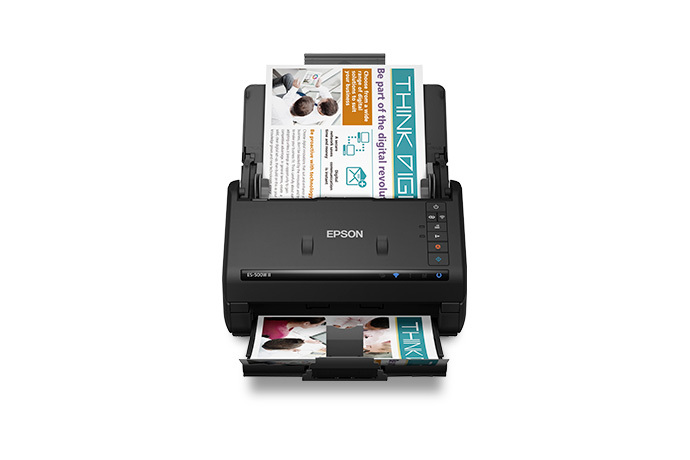
This suits a computer-centered buyer who values 50-sheet one-pass duplex, USB or Wi-Fi setup, mobile scanning and TWAIN, but does not need a touchscreen. It is less compelling when computer-free cloud, larger paper-specific feeder loads, or phone capture of long/carrier-sheet originals is essential. Before choosing an offer, verify model B11B263201, current computer software, TWAIN-app support, 2.4 GHz network fit, media limits and the seller's package list. The body image is not a carton photo. This assessment summarizes Epson documentation; it is not a report of ownership, hands-on use, measured performance, current stock or price.
Certified ReNew ES-500W II: same scanner family, separate offer
Epson separately identifies the WorkForce ES-500W II Certified ReNew offer as part B11B263201-N. Its exact U.S. page repeats the duplex/wireless model description and lists the same 50-sheet feeder, Epson ScanSmart and TWAIN claims; it also displays a one-year limited warranty and 30-day return-policy badges. These are dated manufacturer offer terms, not a guarantee for another suffix or seller listing. Check exclusions and confirm that the current checkout details still apply to B11B263201-N. The page does not itemize a complete renewed carton or confirm the inclusion of optional carriers and other accessories. The product image above shows the ES-500W II scanner body, not a renewed unit or package contents. See the exact Certified ReNew listing before choosing this condition offer.
Key specifications
Key details at a glance
| Scanner class | Desktop sheet fed document scanner |
|---|---|
| Manufacturer-listed simplex rate | 35 ppm |
| Manufacturer-listed duplex image rate | 70 ipm |
| Automatic document feeder capacity | 50 sheets |
| Optical resolution | 600 dpi |
| Connection options | USB / Wi-Fi |
| Automatic duplex capture | Yes |
| Separate manual-feed route | No |
| Touchscreen | No |
| TWAIN driver documented | Yes |
Use the exact model’s instructions for operating limits, supplied equipment and version differences.
Sources for this review
Sources for this assessment
Compare the workflow before you choose
Use the finder to test your connection, paper and software requirements against the documented scanner arrangements.