
Your needs, this model
Does it fit your priorities?
Can the V19 II scan an individual document over USB?
Yes. Epson describes a USB-powered flatbed with ScanSmart document scanning from a connected Windows PC or Mac. Each original is placed on the glass; no ADF stack is specified.
Explore this need in the finder →Will the V19 II automatically capture both sides of a sheet?
No automatic duplex path is documented. The manual describes manually placed flatbed originals, so the sheet must be handled and turned by the user for a second side.
Explore this need in the finder →Does its feeder meet a 20-sheet minimum?
No ADF or ADF capacity is specified. The V19 II scans one manually positioned original on glass and cannot be matched to a minimum ADF-load requirement.
Explore this need in the finder →Does it offer a separate manual-feed path for occasional special originals?
No separate selectable feed path is documented. The glass is the scanner's platen source, not a second manual-feed inlet alongside an ADF.
Explore this need in the finder →Can it send scans to cloud storage without a computer?
No. Epson's shared guide sends cloud uploads through ScanSmart on a connected computer and requires internet access; an account authorization may also be needed.
Explore this need in the finder →Does the exact V19 II driver satisfy a TWAIN-only capture application?
The exact product/support/guide pages reviewed do not establish a model-specific TWAIN driver. Treat this as unverified and confirm the current B11B267201 driver, host OS and named application before relying on it.
Explore this need in the finder →Can it scan from a phone or select profiles on a touchscreen?
No phone/tablet route or touchscreen profile interface is documented for the reviewed USB-to-computer arrangement; its physical buttons start a computer software workflow.
Explore this need in the finder →Research-based assessment of the exact Epson U.S. Perfection V19 II, part B11B267201. I have not tested or owned this scanner; the assessment is based on Epson's product page, support page and shared V19 II/V39 II guide.
A photo-capable flatbed that also handles documents
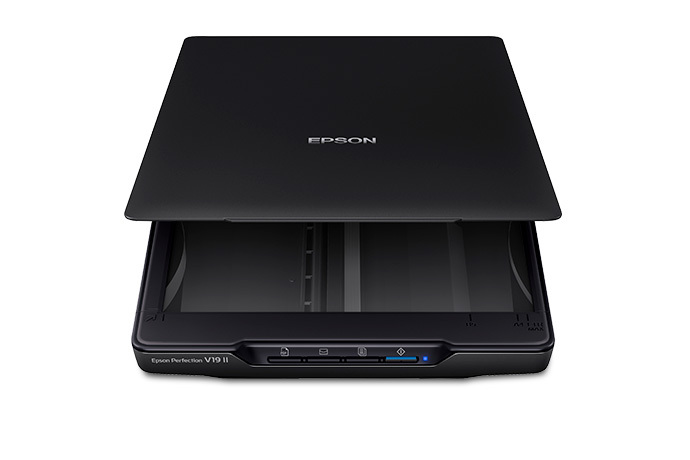
The Perfection V19 II is described by Epson as a color photo and document flatbed. It can scan ordinary pages, photographs, artwork, books and other originals that fit on its glass. That makes it relevant to this document-scanner guide, but it is not a small automatic feeder: every original must be placed on the platen and lifted away by hand. The maximum listed document area is 8.5 by 11.7 inches, or U.S. Letter/A4. A run of papers therefore means a repeated place, scan and replace routine rather than loading a stack.
Its 4800 dpi optical specification and photo-restoration software are more useful to people who also digitize pictures than to a routine built around filing piles of office pages. Epson lists 3.1 lb and USB power, with a kickstand for upright storage and a high-rise removable lid for thicker items such as books and albums. The lid helps with bound material, but it does not enlarge the glass area or turn the platen into an ADF.
Computer-led scanning, with OCR and simple exports
The reviewed route is one USB connection to a computer. Epson ScanSmart on a connected Windows PC or Mac provides document, photo and automatic modes, lets the user review the captured images, and offers common save, email and print actions. The product page describes one-touch PDF and email buttons and searchable PDF creation with optical character recognition. Epson also lists editable Word, Excel and PowerPoint output through OCR. These are software-supported outcomes, not a promise that text recognition will be accurate for every original or that a named document-management program will accept a particular driver.
Epson quotes as little as 10 seconds for a Letter scan at 300 dpi in black-and-white, grayscale or color. That is a manufacturer figure under its stated condition, not a speed I measured and not an end-to-end filing time. It does not include every possible delay from starting software, checking the result, correcting OCR or saving to a destination. High-resolution photo work is a different task from routine text capture, and the manual warns that the scan area can be restricted at large resolution settings.
The important distinction: no feeder and no automatic two-sided pass
There is no ADF capacity listed for the V19 II, so it cannot satisfy a minimum feeder-load requirement. The guide describes a flatbed and software workflow; it does not document automatic duplex. Scanning both faces means handling the sheet again and turning it over manually. Nor does the model have the separate, selectable manual-feed path used by some feeder scanners for cards, envelopes or folded originals. The glass is a useful alternate source for one flat or bound original at a time, but that is not the same capability in the questionnaire.
That distinction sets the buying boundary. The V19 II may suit someone who scans a few individual pages, books or photographs and values one simple computer-connected setup. It is a poor match for a daily stack, an automatic two-sided job, shared batch intake or any workflow whose essential requirement is a 20-sheet-or-larger ADF. A daily-volume claim should not be inferred from a one-page flatbed process.
What it shares—and does not share—with the V39 II
The V19 II is a separate U.S. model, B11B267201, rather than a software option for the V39 II. The shared guide explains the meaningful photo difference: V19 II uses basic stitching, which combines two images placed side-by-side or top-to-bottom. Epson's V39 II guide adds advanced stitching that automatically detects overlapping areas. This can matter when reconstructing a larger photo or artwork from multiple scans, but it is not a document-feeder advantage. Stitching has image-size limits and does not work with every image, including some monochrome pictures and charts.
V19 II can send scans to cloud services through ScanSmart, but this is computer-mediated: the connected computer runs the software, internet access is required, and the service may require account authorization. No Wi-Fi, mobile-device or scanner-only cloud route is established for this exact part. The product image and the phrase “one touch” do not change that wiring and software boundary.
Checks before choosing the V19 II
Confirm that the offered scanner is the U.S. B11B267201 and that its included USB cable, host computer and available driver/software version suit the intended setup. Epson's support page requires selecting an operating system; its existence does not guarantee compatibility with every OS revision or named application. I could not verify an exact-model TWAIN driver statement in the sources examined, so a TWAIN-dependent capture program should be checked with Epson and its software vendor rather than assumed to work because ScanSmart can create PDFs. Also confirm that manual single-page handling is acceptable, that the largest original fits the 8.5 by 11.7 inch glass, and that any cloud destination remains available in the current ScanSmart version.
For a more automated stack workflow, compare this profile with the feeder models in the ADF and duplex guide. For the exact V39 II photo-stitching difference, see the V39 II assessment. Keep USB-to-computer as the same condition in the scanner finder.
Key specifications
Key details at a glance
| Scanner class | USB-connected flatbed document scanner (manual platen) |
|---|---|
| Optical resolution | 4800 dpi |
| Connection options | USB |
| Automatic duplex capture | No |
| Separate manual-feed route | No |
| Touchscreen | No |
Use the exact model’s instructions for operating limits, supplied equipment and version differences.
Sources for this review
Sources for this assessment
- Epson U.S.: Perfection V19 II Color Photo and Document Flatbed Scanner
- Epson U.S. Support: Perfection V19 II
- Epson Perfection V19 II / V39 II User's Guide
- Epson V19 II / V39 II guide section: ScanSmart document and photo modes
- Epson V19 II / V39 II guide section: Sending a Scan to a Cloud Service
- Epson V19 II / V39 II guide section: General Specifications
Compare the workflow before you choose
Use the finder to test your connection, paper and software requirements against the documented scanner arrangements.