
Your needs, this model
Does it fit your priorities?
Can the V39 II scan an individual document over USB?
Yes. Epson describes a USB-powered flatbed with ScanSmart document scanning from a connected Windows PC or Mac. Each original is placed on the glass; no ADF stack is specified.
Explore this need in the finder →Will the V39 II automatically capture both sides of a sheet?
No automatic duplex path is documented. The manual describes manually placed flatbed originals, so the sheet must be handled and turned by the user for a second side.
Explore this need in the finder →Does its feeder meet a 20-sheet minimum?
No ADF or ADF capacity is specified. The V39 II scans one manually positioned original on glass and cannot be matched to a minimum ADF-load requirement.
Explore this need in the finder →Does it offer a separate manual-feed path for occasional special originals?
No separate selectable feed path is documented. The glass is the scanner's platen source, not a second manual-feed inlet alongside an ADF.
Explore this need in the finder →Can it send scans to cloud storage without a computer?
No. Epson's shared guide sends cloud uploads through ScanSmart on a connected computer and requires internet access; an account authorization may also be needed.
Explore this need in the finder →Does the exact V39 II driver satisfy a TWAIN-only capture application?
The exact product/support/guide pages reviewed do not establish a model-specific TWAIN driver. Treat this as unverified and confirm the current B11B268201 driver, host OS and named application before relying on it.
Explore this need in the finder →Can it scan from a phone or select profiles on a touchscreen?
No phone/tablet route or touchscreen profile interface is documented for the reviewed USB-to-computer arrangement; its physical buttons start a computer software workflow.
Explore this need in the finder →Research-based assessment of the exact Epson U.S. Perfection V39 II, part B11B268201. I have not tested or owned it; claims below come from Epson's exact product and support pages and the V19 II/V39 II guide.
A glass-bed scanner for individual documents and photos
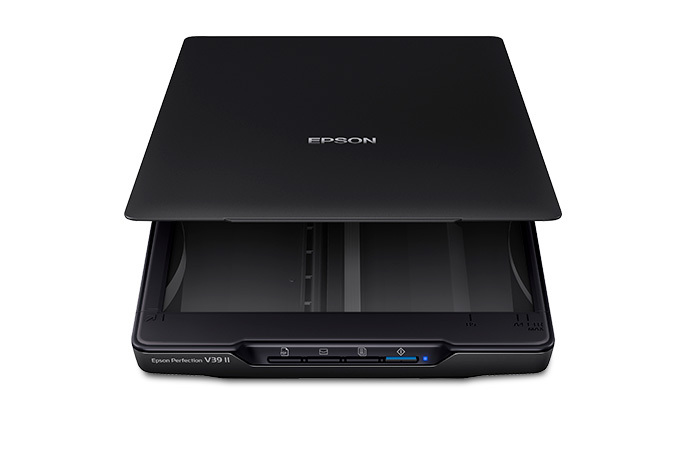
The Perfection V39 II has a clear use case: scan items one at a time from a flatbed while also handling photographs, artwork and books. Epson's product page explicitly calls it a color photo and document scanner and lists a maximum Letter/A4-sized platen area of 8.5 by 11.7 inches. The high-rise removable cover is intended to accommodate thicker originals, while a built-in kickstand supports vertical storage. The scanner weighs 3.1 lb and is USB-powered, so its setup stays tied to a connected computer rather than a separate network or stand-alone control panel.
That simplicity comes with a real throughput limit. Epson does not specify an ADF for this model. Each page must be positioned on the glass, scanned, removed and replaced; a multi-page file is assembled in software rather than by loading a paper stack. If automatic two-sided capture is essential, the user would need to turn each original by hand. A glass platen is also not the finder's distinct manual-feed mode: it is the scanner's only original source, not a special inlet for occasional originals alongside a regular feeder.
Where the V39 II differentiates itself
The exact U.S. part is B11B268201. Like the V19 II, it lists 4800 dpi optical resolution, one-touch buttons, Easy Photo Fix, OCR-supported editable Office documents and a manufacturer-quoted Letter scan as fast as 10 seconds at 300 dpi. Epson's manual says the 10-second figure is a Letter scan at 300 dpi in black-and-white, grayscale or color; it is not an independent test or a guarantee for every computer, setting, original or saved file. It also says the scanning area may be restricted at high resolution. Those headline photo specifications do not create a stack feeder or predict how quickly someone can review and file a batch.
The material difference from the lower-numbered V19 II is its advanced photo-stitching mode. Epson's shared guide says the V19 II basic method combines two scans placed side-by-side or top-to-bottom. The V39 II can instead identify overlapping areas automatically; the originals may be rescanned with shifted overlap before the images are combined. This is a photo/artwork workflow, not a distinct document-feed mode. Epson also warns that some content—such as monotone images and charts—cannot use the feature, and sets a 25,000-pixel longest-edge limit for advanced stitching. Basic stitching has separate, larger Windows/Mac pixel limits. Someone who never joins multiple images should not treat this software distinction as a reason to pay more or as evidence of better ordinary document intake.
USB-to-computer is the documented operating plan
The manual's scan process starts with the scanner software installed and the product connected to the computer. ScanSmart lets the user review scans and choose where to save, print, email or send them to a supported cloud service. A cloud upload requires internet access and sign-in; Epson notes that authorization may be requested and that the destination structure has restrictions. This route still needs the computer running ScanSmart. The V39 II is not documented here as Wi-Fi-capable, phone-scannable or able to send to cloud storage by itself. The exact product page's cloud claim should not be mistaken for computer-free cloud operation.
Epson's product page and manual document USB and a computer software workflow, but I did not find an exact-part statement establishing TWAIN support in the sources reviewed. If a named capture application requires TWAIN, verify the exact driver/OS pair with Epson and the application provider; do not equate a successful ScanSmart PDF export with a TWAIN driver. The model's physical buttons trigger a computer workflow rather than selecting on-device touchscreen profiles.
Choose it only if repeated platen handling suits the job
The V39 II is plausible for a home desk or archive where the expected work is a small number of documents, books and photos, and a computer is already part of each scan. OCR and common file exports can help turn the glass capture into useful records, while advanced stitching supplies a specific benefit for oversized photographic material. It is not a natural choice for a queue of paperwork, frequent two-sided pages, or a team that needs a feeder's one-load capacity. The absence of an ADF means its numeric ADF capacity is unknown/not established for matching purposes, not “one sheet” as a selectable ADF rating.
Before choosing an offered unit, check the physical label for B11B268201, the current Epson ScanSmart and driver support for the intended computer, the USB connection, the supported cloud destination and any required account. Confirm that the originals fit the 8.5 by 11.7 inch glass and that manual page turning is acceptable. Current product/support pages make this an active manufacturer reference, not a claim about seller inventory, exact package contents or condition.
Compare the USB flatbeds and their one-page-at-a-time limits in the connection guide; compare feeder alternatives in the paper-handling guide. The V19 II uses basic stitching rather than the V39 II's advanced overlap detection; read the V19 II assessment for that distinction. Keep the same USB choice in the finder.
Key specifications
Key details at a glance
| Scanner class | USB-connected flatbed document scanner (manual platen) |
|---|---|
| Optical resolution | 4800 dpi |
| Connection options | USB |
| Automatic duplex capture | No |
| Separate manual-feed route | No |
| Touchscreen | No |
Use the exact model’s instructions for operating limits, supplied equipment and version differences.
Sources for this review
Sources for this assessment
- Epson U.S.: Perfection V39 II Color Photo and Document Flatbed Scanner
- Epson U.S. Support: Perfection V39 II
- Epson Perfection V19 II / V39 II User's Guide
- Epson V19 II / V39 II guide section: ScanSmart document and photo modes
- Epson V19 II / V39 II guide section: Sending a Scan to a Cloud Service
- Epson V19 II / V39 II guide section: General Specifications
- Epson V19 II / V39 II User's Guide: help contents index
Compare the workflow before you choose
Use the finder to test your connection, paper and software requirements against the documented scanner arrangements.