
Your needs, this model
Does it fit your priorities?
What does the fi-8950 FADGI package add beyond the scanner chassis?
PFU's current bundle page lists onsite installation, calibration, verification support, operator training, a GoldenThread Device Level Target and one year of ScanCare Onsite Service. Its linked 2025 datasheet identifies part CG01000-310223, but uses shorter service wording and asks purchasers to call for options. Get the current inclusions and service period in writing; GoldenThread NXT analysis software is separate.
Explore this need in the finder →Does a FADGI label mean every output file is compliant?
No. PFU conditions MTR capability on calibration and rated-speed operation. The FADGI guidelines define a scope for modern textual records and do not make one scanner package a guarantee for images, metadata or retention decisions. Identify the applicable record type, verify representative files and keep the responsible records team in the process.
Explore this need in the finder →Can this wired FADGI bundle send scans directly to cloud storage without a computer?
That route is not established in the reviewed PFU sources. They document USB and wired Ethernet for the fi-8950 and its computer-capture drivers, not Wi-Fi or a computer-free cloud destination. Confirm the intended server, capture application and destination before choosing it for a shared-cloud workflow.
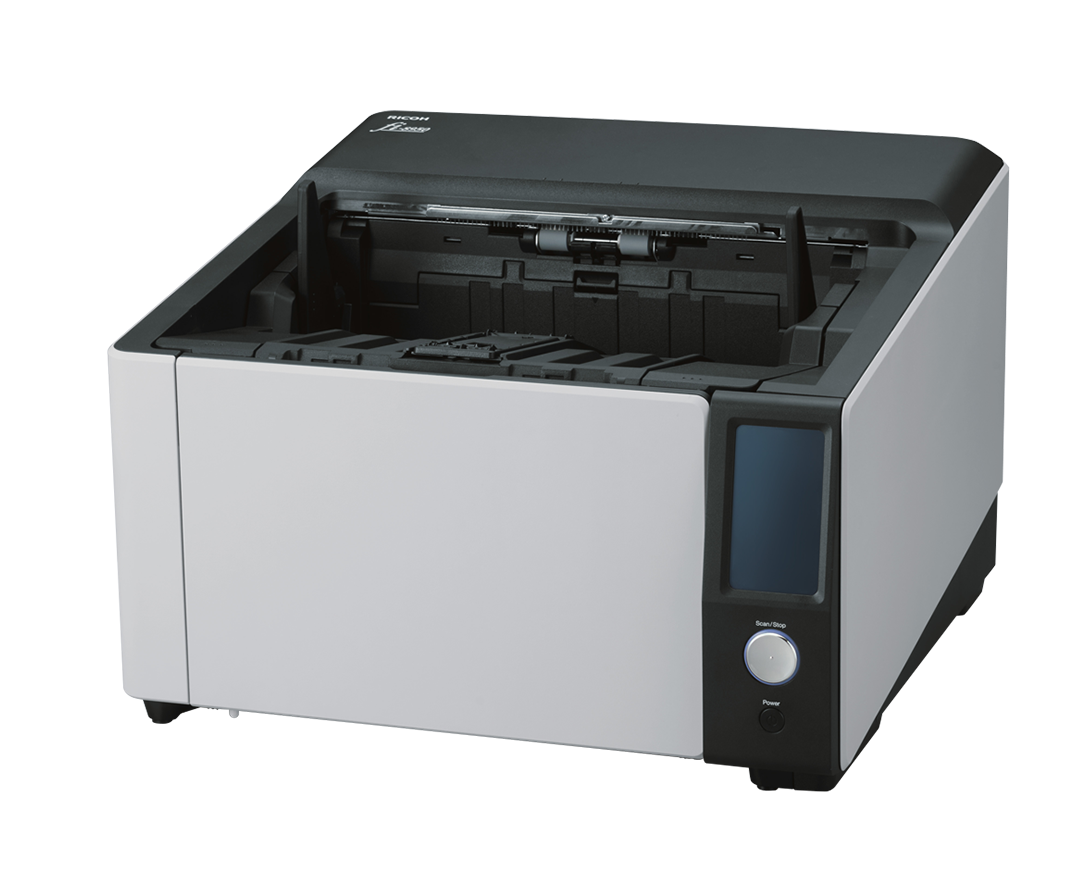
Explore this need in the finder →The Ricoh fi-8950 FADGI scanner bundle is a specific production scanner configuration, not a separate scanning engine. Its distinction is the service and calibration layer attached to the 750-sheet fi-8950: PFU's current FADGI page lists installation, calibration and verification support, operator training, a GoldenThread Device Level Target and one year of ScanCare Onsite Service. The model-specific datasheet identifies the bundle as U.S. part CG01000-310223. The current page's purchase control did not open a bundle-specific checkout, so this assessment does not promise an order, price, current stock or a particular seller package.
What the bundle changes—and what it does not
The physical scanner's headline properties remain those of the fi-8950: a duplex production ADF, up to 750 sheets for the manufacturer's stated stock, USB and Ethernet connections, a 4.3-inch touchscreen, TWAIN/ISIS driver support, and a rated landscape maximum up to 150 ppm/300 ipm under published conditions. This is a wired computer-capture machine; its Ethernet port is not evidence of Wi-Fi, phone scanning or direct cloud delivery. The bundle adds onboarding and calibration-related support rather than a larger feeder or a new connection type.
There is an important version distinction. The current PFU collection lists one year of ScanCare Onsite Service and a GoldenThread Device Level Target, alongside installation, calibration/verification support and training. The linked 2025 datasheet's table uses the shorter phrase “Installation, Training & ScanCare” and instructs buyers to call for purchase options. It also says GoldenThread analysis software must be installed before the service technician arrives. GoldenThread NXT is sold separately. Do not assume every software license, onsite visit, response time, renewal or service condition from one source wording carries over to a new quote.
FADGI support is not a compliance certificate for every job
PFU says the named fi-series scanners can fulfill Modern Textual Records (MTR) requirements when calibrated accordingly and operated at rated speeds; its current page identifies a Keypoint Intelligence evaluation for the fi-8950 bundle. Those statements are useful scope clues, not proof that an organization's files meet its requirements. FADGI's technical guidance treats MTR as a defined class of modern office-paper text. Photographs, maps, bound volumes, fragile records and materials needing fine color or tonal detail can call for different equipment, handling or image-quality criteria. The bundle includes a target and support, but GoldenThread NXT image-analysis software is separate and an organization still needs its own verification and records workflow.
Before considering this package, the digitization lead should name the exact record types, target specifications, accepted file formats and quality checks. Ask what calibration record, verification evidence and training are delivered with part CG01000-310223, which software and license are needed, and how ongoing checks will be handled. If federal retention or permanent-record requirements apply, involve the records officer; scanner capabilities do not determine whether originals may be destroyed or which schedule applies.
Production hardware demands a real operating plan
A 750-sheet load can reduce the number of times staff replenish the feeder, but it is a maximum for stated paper and the manufacturer warns that capacity varies with paper weight. It is not a promise that the scanner will run unattended, nor a substitute for a daily-volume and service plan. The 150 ppm/300 ipm figure is a manufacturer rating, not an observed throughput result; image settings, software, host performance, sorting, verification and document preparation can become bottlenecks. The fi-8930 is a slower 130/260 ppm model with the same stated 750-sheet capacity; the fi-8820 is rated up to 120/240 ppm with a 500-sheet feeder. The bundle question is therefore primarily about the support and calibration workflow, not a scanner speed tier beyond the base model.
The fi-8950 has U-turn and straight-through feed routes, but no flatbed. Those routes have different original-size and media limits; a thicker straight-through original is not automatically suitable for the ordinary ADF. Check the operator guide for the particular stock before introducing cards, folded paper, inserts or fragile originals. The scanner also requires a compatible capture computer: PFU lists TWAIN, TWAIN x64, ISIS and WIA, but the datasheet warns that fi Series scanners do not run with Windows 10/11 ARM-based PCs. Confirm the exact host architecture, driver release and capture software with IT, rather than assuming that a supplied interface guarantees a particular workflow.
Get the package details in writing
The current PFU FADGI collection presents the fi-8950 as a bundle, but its “Shop now” path reaches the underlying scanner page rather than a package-specific cart. The linked dated PDF supplies a manufacturer part number and says to call for purchase options. Before an order, ask the vendor to quote CG01000-310223 and itemize the scanner, calibration, target, training, installation location, ScanCare term, software licenses and any continuing service costs. Confirm whether the current bundle terms match the written quote and what onsite coverage means for your facility. No price or stock figure belongs in this assessment because none was verified for a particular buyer or package date.
Who should assess it
This configuration is worth evaluating when a high-volume wired ADF is needed and the organization specifically benefits from PFU's stated calibration, verification, training and onsite-service package. It is difficult to justify for ordinary household paperwork, for work that requires Wi-Fi/mobile or PC-free cloud delivery, or for collections whose originals need a flatbed or non-ADF handling. The separate FADGI and records workflow guide explains how to distinguish scanner capability from image conformance. The ordinary fi-8950 assessment covers the base scanner; this page is about the distinct FADGI configuration. Neither is a hands-on test or a certification of an individual digitization project.
Key specifications
Key details at a glance
| Scanner class | Professional production sheet-fed scanner |
|---|---|
| Manufacturer-listed simplex rate | 150 ppm |
| Manufacturer-listed duplex image rate | 300 ipm |
| Automatic document feeder capacity | 750 sheets |
| Optical resolution | 600 dpi |
| Connection options | USB / Ethernet |
| Automatic duplex capture | Yes |
| Separate manual-feed route | Yes |
| Touchscreen | Yes |
| TWAIN driver documented | Yes |
Use the exact model’s instructions for operating limits, supplied equipment and version differences.
Sources for this review
Sources for this assessment
Compare the workflow before you choose
Use the finder to test your connection, paper and software requirements against the documented scanner arrangements.