
Your needs, this model
Does it fit your priorities?
Will the iX1500 scan both sides of a stack and choose a touchscreen profile?
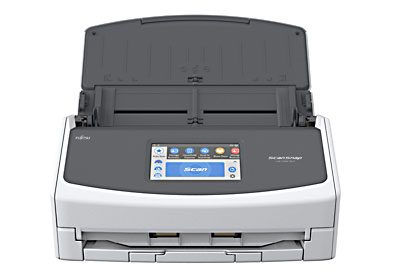
PFU documents a duplex 50-sheet ADF and a 4.3-inch touch panel with up to 30 profiles. The published capacity can be lower with different stock or with the Receipt Guide installed.
Explore this need in the finder →Can I use the special-original feed for folded or oversized pages?
PFU lists a separate Manual Scan mode for examples such as folded A3. The manufacturer says this mode uses ScanSnap Home; it is not the normal ADF path and should not be assumed to work through older software.
Explore this need in the finder →Does its Wi-Fi guarantee a current phone or cloud workflow?
No. Wi-Fi is documented, but current PFU compatibility material no longer lists iX1500 among mobile models and the former ScanSnap Connect app was discontinued. Confirm the exact OS, app, firmware and cloud service before relying on either route.
Explore this need in the finder →Will it work with software that requires TWAIN?
PFU's iX1500 specifications say Windows does not support TWAIN/ISIS and macOS does not support TWAIN. PDF output is not a substitute for a required capture driver.
Explore this need in the finder →A substantial desktop feeder with a software caveat
The ScanSnap iX1500 was built around a desk-based routine: load a batch, choose a workflow on the scanner, and send the captured pages to a computer or another configured destination. PFU lists a 50-sheet automatic document feeder, two-sided capture and a rated speed of up to 30 pages per minute for its stated A4 portrait conditions. The feeder capacity is not a promise for every kind of paper. PFU specifies the 50-sheet figure for 80 g/m² (20 lb) stock and notes that installing the Receipt Guide limits the load to 15 sheets. Mixed paper, curled edges and fragile originals also call for more care than a capacity number can convey.
This assessment is based on PFU/Ricoh’s US product information, model specification and current compatibility material—not a hands-on scan, feed, OCR or speed test. The US product page now marks the iX1500 discontinued and points buyers toward the newer iX2500. The family had black and white finishes, but the sources checked for this review do not establish a current exact US retail part number or a particular seller package. A used or refurbished listing should be identified by its actual label and included items rather than assumed from a generic iX1500 title.
The screen and manual mode are real distinctions
A 4.3-inch color touchscreen and support for up to 30 profiles let the operator select a named scan setup at the device. That can make a shared desk easier to use when different people send pages to different folders or file types. It does not by itself establish account security, access control, or compatibility with a current computer; those depend on the software and network configuration behind each profile.
Alongside the ADF, PFU documents a separate Manual Scan mode for special originals, including folded larger pages. The mode is useful precisely because it is not just “put anything into the stack”: the original is handled as a separate job, and PFU associates this path with ScanSnap Home. If unusual originals are central to the choice, check the current instructions and software availability for the exact host before relying on this feature. The platform’s public finder treats a separate manual route as different from everyday ADF capacity.
PFU lists USB and Wi-Fi, including 2.4 and 5 GHz bands subject to mode and regional qualifications. Both are connection capabilities, not a guarantee that every current PC, phone or service can be paired. The older model literature describes mobile scanning and direct ScanSnap Cloud routing, but PFU’s current ScanSnap Home compatibility table checked for this assessment no longer lists the iX1500 among its supported models, and PFU says the former ScanSnap Connect app was discontinued. Current phone, operating-system, firmware and cloud-service support therefore remain a purchase check, not a reason to select this unit on the basis of an old feature list. For a dependable everyday routine, establish a compatible computer workflow first.
Where it fits—and where it does not
At about 11.5 by 6.3 by 6 inches and 7.5 pounds, the iX1500 is a desktop appliance rather than a travel scanner. A 50-sheet duplex feeder is a meaningful step up from compact 10- or 20-sheet designs for short office batches, but it is not a high-capacity workgroup machine. Manufacturer speed claims should also be read as specified scan modes, not total-job times that include sorting, mixed sizes, double-feed recovery, file naming or OCR review.
One compatibility boundary is especially clear: PFU’s specification says the ScanSnap-specific driver does not provide TWAIN/ISIS support on Windows and does not provide TWAIN on macOS. If a records system, line-of-business tool or capture application requires TWAIN, a searchable PDF workflow is not an equivalent substitute. Confirm that the intended software can import files from ScanSnap Home before buying.
The newer iX2500 is the more straightforward reference point if current support, wireless operation and a larger feeder matter; PFU lists it as the successor. The iX1500 may still make sense when its touchscreen, 50-sheet duplex arrangement and separate manual mode match a modest desk workflow and the price of a specific used offer reflects its age. It is a poor fit if a phone-first route, current cloud delivery, TWAIN integration, or trouble-free support is essential without a verified setup.
Checks for the exact unit
Before choosing a listing, ask for a clear view of the model label, included power supply and cables, and a demonstration that the ADF, touchscreen and both sides of a sheet work. Check roller and pad condition, confirm that the Receipt Guide is not reducing a needed batch size, and inspect whether software is already installed or can still be obtained for the target operating system. Verify the exact color and every included accessory; do not treat carrier sheets or a case as another scanner edition. Finally, test the intended destination and file workflow on the buyer’s own computer before depending on Wi-Fi, mobile scanning or cloud delivery. No independent image-quality, OCR, reliability or throughput result is claimed here.
Key specifications
Key details at a glance
| Scanner class | Desktop duplex adf |
|---|---|
| Manufacturer-listed simplex rate | 30 ppm |
| Automatic document feeder capacity | 50 sheets |
| Optical resolution | 600 dpi |
| Connection options | USB / Wi-Fi |
| Automatic duplex capture | Yes |
| Separate manual-feed route | Yes |
| Touchscreen | Yes |
| TWAIN driver documented | No |
Use the exact model’s instructions for operating limits, supplied equipment and version differences.
Sources for this review
Sources for this assessment
Compare the workflow before you choose
Use the finder to test your connection, paper and software requirements against the documented scanner arrangements.