
Your needs, this model
Does it fit your priorities?
Will it capture both sides of a sheet in one pass?
Yes. PFU lists duplex scanning and explains that both sides are captured without turning the page over by hand.
Explore this need in the finder →Can I use it without Wi-Fi?
Yes. The reviewed Standard Edition is USB-only, so its documented computer workflow does not depend on a wireless connection. The tradeoff is that it is not the mobile or network-sharing option in this pair.
Explore this need in the finder →Can it use a separate manual-feed route for envelopes or folded A3?
PFU Store copy advertises Manual Feed, but the 2026 family comparison lists iX2400 as automatic-feed-only and ScanSnap Help explicitly says it does not support Manual scan; PFU global specifications agree. Do not rely on the conflicting Store bullet without direct confirmation for your original.
Explore this need in the finder →Can it scan straight to my phone over Wi-Fi?
No mobile-device route or Wi-Fi connection is listed for the iX2400. If phone-based capture is essential, compare a model with a documented wireless/mobile plan.
Explore this need in the finder →The short version: a straightforward USB desktop scanner
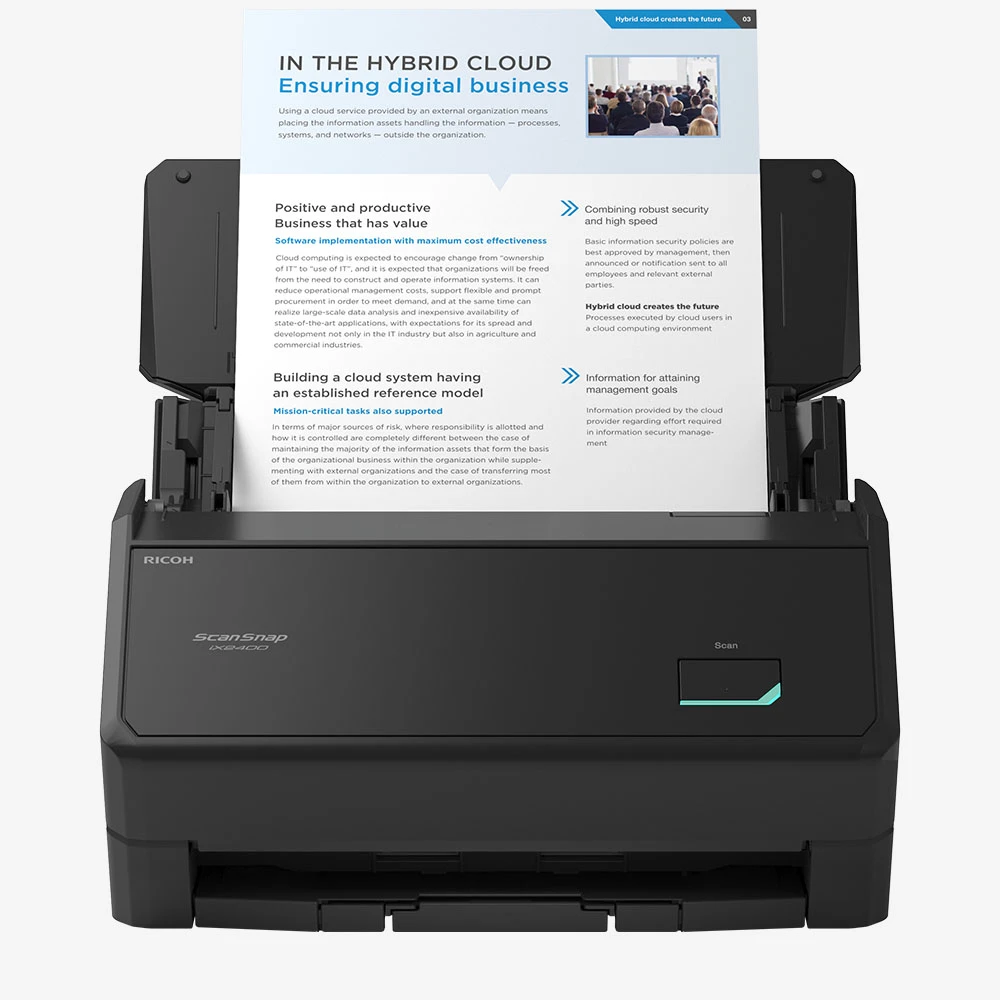
The ScanSnap iX2400 is a useful shortlist candidate when a desktop document scanner should work from one computer with minimal setup choices. PFU describes it as a one-touch, USB-only model. The US Standard Edition is identified as part PA03870-B005. Its 100-sheet automatic document feeder, duplex capture and advertised rate of up to 45 pages per minute / 90 images per minute give it the same basic batch-paper outline as the more connected iX2500. This is an evidence-based review of manufacturer information, not a hands-on test; no scan-speed, feed-reliability or OCR results have been measured independently.
Good fit for ordinary two-sided stacks
A 100-sheet feeder is large enough to reduce repeated loading during many household or small-office jobs, and duplex scanning captures both sides as a sheet passes through. That is more meaningful for a stack of forms, statements or correspondence than an unusually high resolution figure alone. PFU lists 600 dpi optical resolution, but the manufacturer's speed figures are specifications, not a guarantee that every original will move through at the headline pace. The time to separate paper clips, remove fragile pages, review OCR, name files and correct a feed problem belongs in the workflow too.
There is a source conflict worth resolving before treating this as a special-original scanner. The US Store product copy advertises a “Manual Feed mode” for envelopes, cards, folded A3 and sticky-note pages. However, PFU's March 2026 four-model comparison lists the iX2400 as automatic-feed-only, and the current ScanSnap Help explicitly says the iX2400 does not support “Manual scan”; PFU's global specification also marks that mode unavailable. I therefore do not count the iX2400 as having the separate manual route used by iX2500/iX1600, despite the older Store bullet. A carrier sheet is a different accessory path and does not settle this conflict. If a special-original route is essential, ask PFU to confirm the exact original and supported procedure before choosing this model. The manufacturer's product page also describes ultrasonic sensing, skew detection and paper-separation technology. Those are design features, not a guarantee against every double feed or skew, so clean, compatible paper and occasional inspection still matter.
What the USB-only design gives up
The one-cable idea is deliberately simple, but it narrows where and how you can start a scan. PFU's comparison lists USB connectivity only, no mobile-device route and no color touch panel for the iX2400. The computer's Quick Menu can route a scan to a folder, email, printer or an application, and ScanSnap Home organizes documents, receipts, business cards and photos. That is a computer-centered workflow: choose it if the PC or Mac will remain the natural place to check, rename and store files. It is a poor match if someone expects to walk up to the scanner and choose among personal profiles, send directly to a phone, or use Wi-Fi in a room without the host computer connection.
There is a less obvious software limitation to check before buying: PFU says the iX2400 does not include a TWAIN driver. The ability to open PDF or JPEG files in many applications is not the same as a TWAIN capture interface for a document-management system. If a workplace's workflow names a particular driver standard, confirm that exact route with its IT owner before placing the scanner on the shortlist. Included software can produce searchable PDFs and editable Office files, but OCR is not infallible; verify names, dates, totals and handwritten or low-quality originals before relying on extracted text.
Compare the iX2500 on useful differences
PFU's product comparison shows the iX2500 and iX2400 both at 45 ppm / 90 ipm, duplex scanning and 100-sheet ADF capacity. The larger model changes the connection and control experience: Wi-Fi, mobile-device scanning and a 5-inch color touch screen with up to 100 profiles. Those capabilities do not make its paper feeder inherently more suitable for a routine that stays at one computer. The iX2400's simpler set of choices is a real advantage when a shared wireless or no-computer path would add complexity rather than remove it. Conversely, the iX2500 is the clearer fit if scanning must start from multiple destinations or be handed to different users at the device.
Buy the exact package, not a familiar suffix
The US selector identifies Standard PA03870-B005 and a separate Deluxe Edition, CG01000-399209. PFU says Deluxe includes Kofax Power PDF 4.0 for creating, converting, editing and sharing PDFs; it describes the scanner functionality as the same iX2400, not a different wireless or feeder configuration. This review covers the Standard package. For the software-bundle assessment, see the iX2400 Deluxe review. A carrier sheet, cleaning supplies, replacement rollers or service plan can also change package value without changing the basic scanner. Check the exact host OS and software/license terms, USB reach and whether the intended app accepts the files this scanner creates.
When a different scanner type makes more sense
Look beyond the iX2400 for books that cannot be unbound, delicate archival pages needing a flatbed, travel without a computer, standalone Wi-Fi/mobile routing, frequent network sharing, TWAIN-dependent software or a documented high-volume daily workload. This model's appeal is narrower and clearer: efficient-looking duplex paper handling and one-button simplicity for a computer-based personal or small-office routine. The right choice is the one that matches the connection and software you already rely on, not the device with the most options on its feature list.
Key specifications
Key details at a glance
| Scanner class | Personal desktop sheet-fed ADF |
|---|---|
| Manufacturer-listed simplex rate | 45 ppm |
| Manufacturer-listed duplex image rate | 90 ipm |
| Automatic document feeder capacity | 100 sheets |
| Optical resolution | 600 dpi |
| Connection options | USB |
| Automatic duplex capture | Yes |
| Separate manual-feed route | No |
| Touchscreen | No |
| TWAIN driver documented | No |
Use the exact model’s instructions for operating limits, supplied equipment and version differences.
Sources for this review
Sources for this assessment
Compare the workflow before you choose
Use the finder to test your connection, paper and software requirements against the documented scanner arrangements.