
Your needs, this model
Does it fit your priorities?
Can it automatically scan a two-sided page or a stack?
No. PFU describes a manual-feed, simplex CDF path. The next sheet can be fed into the routine, but there is no ADF stack and no automatic two-sided capture.
Explore this need in the finder →Does Dual Scan mean it scans both sides?
No. PFU's Dual Scan feature is for two small originals fed side by side; the scanner remains simplex. Folded large pages use a separate image-stitch workflow and supported carrier-sheet instructions.
Explore this need in the finder →Can I use it wirelessly or scan directly to a phone?
The reviewed S1100i specifications list USB only and no wireless route. Do not confuse it with the later battery/Wi-Fi iX100.
Explore this need in the finder →Will current ScanSnap software run on my computer?
PFU’s exact S1100i model page lists ScanSnap Home on Windows 11/10 and macOS 10.14 or later, but PFU’s separate Home compatibility table dated October 6, 2026 does not list the S1100i among its current or discontinued supported scanners. Because those official pages disagree, do not assume a working installation on your computer; check the exact host, architecture, current installer and activation before buying. PFU also ended ScanSnap Manager distribution and support.
Explore this need in the finder →One original at a time, with a very small footprint
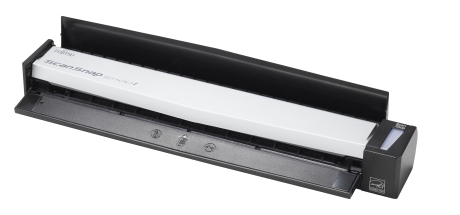
The ScanSnap S1100i is a narrow USB scanner for occasional individual pages, not a miniature automatic document feeder. PFU describes a manual-feed Continuous Document Feeding (CDF) path: the operator inserts one original, then can feed the next page into the continuing scan routine. That can simplify a handful of receipts, forms or travel documents when carrying a small device matters more than unattended stack handling. It is simplex. The machine does not automatically capture both sides of one sheet, and it does not accept a stack in an ADF.
PFU lists 7.5 seconds per A4 portrait page in Auto, Normal, Better and Best modes, and 35 seconds in Excellent mode. These are manufacturer figures for particular modes, not independent timing or total-task speed; page placement, software, image settings, OCR and file organization add their own steps. The 600 dpi optical-resolution figure is likewise a specification, not a claim about measured image quality. At about 10.75 by 1.87 by 1.33 inches and 350 grams (0.77 pound), the body is light and slim, but it needs a connected computer for USB bus power. The reviewed material does not document a built-in battery or wireless connection.
Dual Scan is not duplex
The feature name can invite a mistaken assumption. PFU’s Dual Scan option allows two small originals to be scanned side by side; it does not capture the front and back of one sheet. Folded large pages use a separate image-stitch workflow, not automatic duplex. If two-sided forms or regular batches are the everyday job, a compact duplex ADF such as the S1300i or a newer model is a better starting point.
Media handling depends on the paper path. PFU lists straight-path stock from 52 to 209 g/m² and a narrower 52 to 80 g/m² range for the U-turn path. The standard document limit is up to 8.5 by 14.17 inches; an optional carrier sheet changes the stated maximum for special originals to 11 by 17 inches, and long-paper support is listed separately up to 34 inches. Those numbers depend on the documented setup. They do not mean every stiff, fragile or irregular page can be fed safely. Confirm the path and accessory instructions for the material at hand.
Legacy software is the deciding caveat
For an older unit, software fit can matter more than its size. PFU’s still-published S1100i model page lists ScanSnap Home as supported on Windows 11/10 (32-bit or 64-bit) and macOS Mojave 10.14 or later. But PFU’s separate ScanSnap Home compatibility table, dated October 6, 2026, lists its supported current and discontinued models without the S1100i. The product page itself points users to the latest support information, so those official pages do not provide a clear present-day compatibility assurance for this model. Confirm current installer availability, the exact computer operating system and architecture, activation, and the intended file workflow before buying. PFU has also ended ScanSnap Manager distribution and support. The S1100i uses ScanSnap-specific software; PFU’s specifications say Windows does not support TWAIN/ISIS and macOS does not support TWAIN. A TWAIN-required application should not be assumed to work just because the scanner can produce files.
PFU America’s U.S. operations guide identifies the S1100i, and its 2018 U.S. warranty guide lists the S1100i Series for one-year depot service. That is historical coverage information, not proof that any used unit remains covered; the guide says proof of purchase is required for warranty service. These documents do not establish an exact U.S. scanner retail part number, a current offer, package contents or a seller’s unit condition. Ask for the model label and all included parts. PFU lists a case (PA03610-0001) and a USB cable spare (PA03610-0021) separately; neither is a scanner edition, and neither should be assumed included without a specific offer description.
Who it can suit
This is an on-paper fit for someone with a compatible computer who scans short, mostly one-sided items and values low weight, USB power and single-page control. A useful special case is a person who occasionally captures small originals together through Dual Scan or scans a folded spread with the documented stitch process. The S1100i is a poor match for two-sided stacks, unattended batches, wireless or phone scanning, or a workflow that cannot accommodate a legacy software check.
Compared with the S1300i, the S1100i gives up duplex and its 10-sheet feeder in exchange for a slimmer, lighter one-page device. Compared with the battery-powered iX100, it lacks the documented battery and Wi-Fi workflow; the iX100 still remains a simplex, single-sheet scanner, but its support situation must also be checked separately. These are functional differences, not a claim that one used machine is in better condition than another.
Checks for a used S1100i
Ask to see the label and verify the “i” model, test the included USB cable and computer connection, and confirm that the desired software can be installed on the intended host before purchase. Check the feed rollers, paper exit and cable port, and ask whether any carrier sheet or case is actually part of the offer. Plan on loading each original individually and only one side per pass. No independent feed, image-quality, OCR, reliability or speed testing is claimed here.
Key specifications
Key details at a glance
| Scanner class | Portable single sheet scanner |
|---|---|
| Optical resolution | 600 dpi |
| Connection options | USB |
| Automatic duplex capture | No |
| Touchscreen | No |
| TWAIN driver documented | No |
Use the exact model’s instructions for operating limits, supplied equipment and version differences.
Sources for this review
Sources for this assessment
- PFU America: ScanSnap S1100i operations guide
- PFU America: ScanSnap product limited-warranty guide listing the S1100i series
- PFU/Ricoh: ScanSnap S1100i specifications, feed paths and software
- PFU/Ricoh: current ScanSnap Home compatible-scanner and platform list
- PFU America: ScanSnap Manager availability and end-of-support notice
- PFU Ricoh Store: case for S1100/S1100i
- PFU Ricoh Store: USB cable spare part for S1100/S1100i
- PFU America: ScanSnap S1100i U.S. Operations Guide
- PFU America: Limited Warranty Guide, ScanSnap Products (2018)
- PFU/Ricoh Global: exact ScanSnap S1100i model page and system requirements
- PFU/Ricoh Global: ScanSnap Home supported-scanner table (as of 2026-10-06)
- PFU America Store: pre-boundary ScanSnap default and certified-refurbished scanner listing crosswalk
Compare the workflow before you choose
Use the finder to test your connection, paper and software requirements against the documented scanner arrangements.