
Your needs, this model
Does it fit your priorities?
Can this model duplex a short stack without loading each page by hand?
PFU describes a duplex ADF that holds 10 sheets. It is a modest feeder, not a large unattended office stack; check paper weight and loading instructions.
Explore this need in the finder →Will USB bus power be as fast as the AC adapter?
No. PFU's table lists 12 ppm in Normal mode with AC but 4 ppm in Normal mode on USB bus power, and the bus-powered setup needs two computer USB ports.
Explore this need in the finder →Can I scan from a phone, or connect it wirelessly?
The reviewed S1300i sources document USB but do not establish Wi-Fi or mobile-device scanning. Choose it only if a wired computer workflow is suitable.
Explore this need in the finder →What routine consumable maintenance should I check?
PFU's Store lists a model-compatible pick roller and pad assembly with manufacturer-recommended replacement intervals. Confirm exact parts and maintenance condition on any used offer.
Explore this need in the finder →A small duplex ADF that depends on its power arrangement
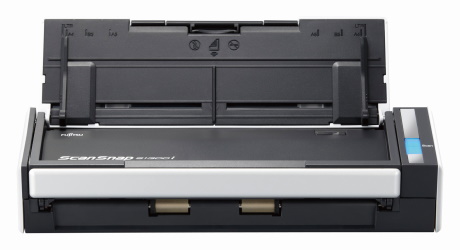
The ScanSnap S1300i is a compact, earlier-generation desktop scanner for short USB-connected batches. PFU’s specification describes automatic two-sided capture through a 10-sheet feeder, 600 dpi optical resolution and a maximum 12 pages per minute / 24 images per minute in its stated AC-powered Normal mode. That is enough capacity to avoid placing every page by hand, but ten sheets is still a short stack. It is a different proposition from today’s 20-sheet compact feeders and from larger office scanners.
There is a meaningful speed split that can get lost in abbreviated listings. PFU’s detailed table lists 12 ppm in Normal mode on the AC adapter, 6 ppm in Auto mode, and up to 4 ppm in Normal mode when bus-powered over USB. The USB-powered arrangement also needs two computer USB ports—one for data and one for power. The included AC adapter is therefore not just a spare accessory if predictable throughput matters. These are manufacturer mode figures rather than independent testing or a promise about a complete job.
USB-only and software age change the buying decision
The S1300i connects by USB 2.0 or 1.1. The reviewed model-specific material does not establish Wi-Fi, a mobile scan route or a computer-free cloud workflow. It is best considered when a nearby computer can own the scan routine. The scanner is roughly 11.18 by 3.9 by 3.03 inches and weighs about 3.08 pounds, so it is compact enough to move around a desk but not a battery-powered travel device.
Current software is the larger uncertainty than the published hardware figures. PFU’s US page identifies the S1300i as discontinued and points to the iX1300 as a replacement. PFU’s current ScanSnap Home compatibility list checked for this review does not include the S1300i among its currently supported models. PFU also states that ScanSnap Manager distribution and support ended on October 31, 2024. That does not prove that every old installation has stopped working, but it does mean a buyer should not assume that today’s download, operating system or phone app will support a used unit. Confirm the exact OS, driver package, connection and application on the actual computer before paying.
The driver is ScanSnap-specific: PFU’s model specification says Windows does not support TWAIN/ISIS and macOS does not support TWAIN. If the scanner must feed directly into a TWAIN-only records application, do not infer that compatibility from the ability to save a PDF. Check whether the application accepts exported files and whether the file-handling steps are acceptable.
Paper handling and upkeep
A short automatic feeder is useful for invoices, correspondence and similar paper, but it should not be confused with a separate special-original manual mode. The sources reviewed for this assessment do not establish the iX1500-style Manual Scan route on the S1300i. The published paper range and maximum document dimensions should be checked against the originals, especially if stock is unusually light, heavy, long or delicate. Optional carrier sheets are accessories with their own model-compatibility rules; they do not increase the ADF capacity or turn the scanner into a different edition.
Maintenance matters more on an older feeder than a new feature list suggests. PFU’s Store identifies a replacement pick roller (PA03541-0001) and pad assembly (PA03541-0002) for the S1300/S1300i family. The stated replacement guidance is up to 100,000 sheets or one year for the pick roller and up to 10,000 sheets or one year for the pad assembly. Treat those as manufacturer recommendations, not proof of the condition of any particular used scanner. Ask about scan volume, feed errors, parts replacement and whether the exact compatible consumables are available. PFU also lists a carrying case and ScanAid kit; those are distinct accessories, not evidence that they are included in a seller’s scanner bundle.
Who should consider it?
The S1300i is a conditional fit for someone who values a small duplex ADF, can work over a wired computer connection and can verify functioning compatible software. It is not a good default for phone-first scanning, wireless placement or TWAIN integration. Someone who expects to scan frequently without an AC outlet should factor in the extra USB port and slower bus-powered rate rather than looking only at the 12-ppm headline.
Its current successor, the iX1300, adds Wi-Fi and a 20-sheet feeder and has a current product/support path, though its own mobile and software needs still deserve checking. The S1100i is smaller and lighter but is simplex and feeds originals one at a time; the S1300i is the more relevant of the two when automatic two-sided stack feeding matters. Neither comparison establishes that a particular used offer is complete or operational.
Checks before buying an older unit
Verify the model label includes the “i” suffix, ask whether the AC adapter is present, and confirm that the feeder handles both sides without skew or repeated feed faults. Check the scanner’s cable and roller/pad state, and match the intended computer against an actually available driver before purchase. Confirm whether any advertised case, ScanAid supplies or carrier sheets are included rather than assuming from a product-family photo. Finally, remember the 10-sheet limit and the slower USB bus-power path. No hands-on feed, image-quality, OCR or speed test is represented here.
Key specifications
Key details at a glance
| Scanner class | Portable desktop duplex adf |
|---|---|
| Manufacturer-listed simplex rate | 12 ppm |
| Manufacturer-listed duplex image rate | 24 ipm |
| Automatic document feeder capacity | 10 sheets |
| Optical resolution | 600 dpi |
| Connection options | USB |
| Automatic duplex capture | Yes |
| Touchscreen | No |
| TWAIN driver documented | No |
Use the exact model’s instructions for operating limits, supplied equipment and version differences.
Sources for this review
Sources for this assessment
- PFU America: ScanSnap S1300i discontinued page and driver/manual links
- PFU/Ricoh: ScanSnap S1300i specifications and power-mode speeds
- PFU/Ricoh: current ScanSnap Home compatible-scanner and platform list
- PFU America: ScanSnap Manager availability and end-of-support notice
- PFU Ricoh Store: ScanAid consumable/cleaning kit for S1300i
- PFU Ricoh Store: pick roller for S1300/S1300i
- PFU Ricoh Store: pad assembly for S1300/S1300i
- PFU Ricoh Store: case for S1300/S1300i
Compare the workflow before you choose
Use the finder to test your connection, paper and software requirements against the documented scanner arrangements.