
Your needs, this model
Does it fit your priorities?
Can it scan a small two-sided stack automatically?
Yes. PFU documents an automatic duplex ADF with a maximum 10-sheet load at the stated 20 lb / 80 g/m² basis. That falls below the finder’s minimum selectable 20-sheet requirement, and the maximum varies with paper weight.
Explore this need in the finder →Can I rely on the rated speed when away from an AC outlet?
Not at the same rated mode. PFU lists 8 ppm in Normal mode on the AC adapter and 4 ppm in Normal mode with USB bus power; bus power also needs two computer USB ports, one for data and one for power.
Explore this need in the finder →Will it still work with my current computer or phone?
That is unverified. The model is tied to legacy ScanSnap software, PFU ended distribution/support for ScanSnap Manager in 2024, and the old Scan to Mobile workflow depended on software whose mobile-app distribution ended in 2025. Check the exact host, installer and application before purchase.
Explore this need in the finder →Does the Deluxe bundle add a faster scanner or guarantee software transfer?
No scanner-engine change is documented. The U.S. sheet names PA03603-B015 as a Deluxe package with Rack2-Filer 5.0; the source does not establish that a particular used unit includes its media or a transferable working license.
Explore this need in the finder →A ten-sheet duplex feeder with a clear ceiling
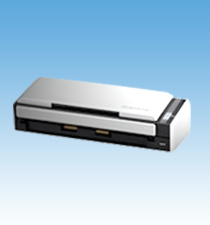
The unsuffixed ScanSnap S1300 is a compact, earlier-generation scanner built around a small automatic document feeder, not a modern network workflow. Fujitsu's U.S. sheet identifies the base model as PA03603-B005; PFU's archived specification describes a duplex ADF, 600 dpi optical resolution and color, grayscale and monochrome modes. The model is easy to confuse with the later S1300i, but its published rate is lower: the S1300 is rated up to 8 pages per minute in Normal mode with the AC adapter, while PFU's S1300i materials list a faster 12 ppm in its Normal AC mode. These are manufacturer settings, not independently timed results.
The important paper limit is the feeder itself. PFU rates the chute for at most 10 sheets of Letter/A4 stock at 20 lb (80 g/m²), and warns that maximum capacity changes with paper weight. That is enough to turn a few pages over automatically, but it is a short batch: the site's numeric finder begins at 20 sheets, so this model cannot satisfy even its smallest ADF minimum. Paper listed for the scanner ranges from 17.1 to 28 lb; documents can extend to Legal-size dimensions and long-paper mode is stated up to 34 inches, except in the highest-resolution Excellent mode. Those exceptions matter more than treating the headline feeder count as universal.
Two power plans, neither wireless
The S1300 connects to a computer over USB 2.0 or 1.1. Its normal AC-adapter path has the better rated speed; the USB bus-power path is a portability compromise, with PFU listing 4 ppm in Normal mode rather than 8. Bus power is not a single-cable convenience in the published setup: PFU specifies two host USB ports, one for the data cable and another for the power cable. That is a practical restriction for a laptop with limited ports, and a used unit should be checked for both the correct adapter and bus-power cable if both plans matter.
No built-in Wi-Fi or computer-free cloud route is established for the unsuffixed S1300. Its older Operator's Guide does describe a Scan to Mobile routine, but it is mediated by software running on a connected computer rather than a direct wireless scanner connection. PFU later ended distribution and support of ScanSnap Connect Application on October 15, 2025 and says it can no longer be downloaded. The current mobile compatibility material does not name the S1300, and the S1300 must not inherit the distinct S1300i's app entry. Existing installations may behave differently, but a new buyer should not count on phone capture without verifying the exact software and host first.
Legacy software is the deciding uncertainty
The archived S1300 page names ScanSnap Manager V5.1 for Windows and V3.2 for Mac OS, along with period-specific applications such as Organizer, CardMinder and FineReader. The product materials describe searchable-PDF and OCR workflows, but those historical software features do not establish that the scanner can be installed on a current computer. PFU ended distribution and support for ScanSnap Manager in November 2024, and the current ScanSnap Home compatibility page saved for this assessment does not include the S1300. Neither fact proves an old preserved installation cannot work; together they make the exact operating system, installer, application and interface a pre-purchase check rather than an assumption.
There is another workflow boundary for records software. PFU describes the S1300 as using a ScanSnap-specific driver and explicitly says that Windows does not support TWAIN/ISIS and Mac OS does not support TWAIN. A scanner that can generate PDF files is not necessarily a direct TWAIN source for a capture application. If direct integration is mandatory, this is not a safe match on the reviewed evidence; check the named application or consider a different supported scanner.
Bundle labels are software, not a different scanner
The U.S. data sheet also names a Deluxe S1300 bundle, PA03603-B015, which includes a Rack2-Filer 5.0 license. That is a package distinction, not a second feed engine or faster S1300. The source does not show that a particular resale unit still contains its DVD, valid license or transferable software entitlement. Check the carton, supplied media, license terms and unit condition individually; the regular PA03603-B005 identity does not imply those extras.
Maintenance should be part of any used-unit inspection. PFU's exact-model specification lists a pick roller and pad assembly with suggested replacement intervals, but those recommendations are not evidence of the condition of a particular scanner. Ask about feed errors and prior servicing, inspect the guides and pickup surfaces, and confirm that the required cables and adapter are present. The official page lists closed-chute dimensions of about 11.18 × 3.90 × 3.03 inches and a weight of 3.08 lb without the adapter; neither figure promises that accessories or an intact used package accompany the body.
Who should consider it?
The S1300 is only a conditional fit for someone who wants occasional short duplex batches, can accept a 10-sheet limit and already has a verified way to run the legacy software. It is not a sensible default for a 20-sheet minimum, wireless sharing, current phone-first capture, or direct TWAIN integration. The later S1300i keeps the compact duplex concept but has its own higher manufacturer rating and distinct specifications; the S1100 is a different single-sheet simplex design. Do not use either model's features to fill gaps in the S1300 record.
This is a research-based assessment of manufacturer documentation, not a hands-on test. No unit was owned, scanned, measured or inspected, and no present seller offer, package completeness or current software compatibility is implied. Before considering an older S1300, verify the exact unsuffixed model label and PA03603 part, check the intended computer and available installer, confirm the adapter and cables, and examine the feeder's condition and maintenance history.
Key specifications
Key details at a glance
| Scanner class | Portable desktop duplex adf |
|---|---|
| Manufacturer-listed simplex rate | 8 ppm |
| Automatic document feeder capacity | 10 sheets |
| Optical resolution | 600 dpi |
| Connection options | USB |
| Automatic duplex capture | Yes |
| Touchscreen | No |
| TWAIN driver documented | No |
Use the exact model’s instructions for operating limits, supplied equipment and version differences.
Sources for this review
Sources for this assessment
- PFU America U.S. discontinued-scanner roster
- Fujitsu U.S. ScanSnap S1300 datasheet, part PA03603-B005
- PFU/Ricoh archived exact-model ScanSnap S1300 specification and software page
- PFU ScanSnap S1300 Getting Started, P3PC-2712-03EN
- PFU ScanSnap S1300 Operator's Guide, P3PC-2722-03ENZ0
- PFU/Ricoh ScanSnap Manager distribution/support termination notice
- PFU/Ricoh ScanSnap Home supported-model specification
- PFU notice of ScanSnap Connect Application termination
- PFU mobile compatibility table for discontinued ScanSnap models
- PFU/Ricoh exact S1300 official body image
Compare the workflow before you choose
Use the finder to test your connection, paper and software requirements against the documented scanner arrangements.