
Your needs, this model
Does it fit your priorities?
Does its 50-sheet feeder meet a 50-sheet minimum?
On the documented basis, yes: the U.S. S1500 sheet says a maximum 50 Letter sheets at 20 lb (80 g/m²). PFU notes capacity varies with paper weight, so the number is per qualifying loading, not a promise for every stock or daily volume.
Explore this need in the finder →Can it connect to a current capture application through TWAIN?
The exact model page lists a ScanSnap-specific driver and says Windows does not support TWAIN/ISIS and macOS does not support TWAIN. A searchable PDF output is not evidence of a TWAIN source; check the named application's requirements before considering it.
Explore this need in the finder →Will it install on my current computer?
Do not assume so. PFU says the legacy model is not supported by ScanSnap Home and Manager is no longer supported or downloadable; verify a specific host, existing lawful installation and application before purchase.
Explore this need in the finder →Does every S1500 listing include the software and accessories shown in the old brochure?
No. PA03586-B005 identifies the historical base model, but the exact used package, setup media, Acrobat/CardMinder entitlement, cables, power adapter and seller condition must be checked individually; the separate S1500M package has different software references.
Explore this need in the finder →A 50-sheet duplex feeder, on a qualified paper basis
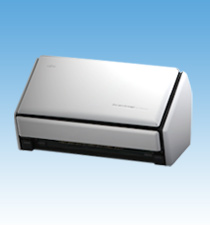
The U.S. specification identifies this model as the Fujitsu ScanSnap S1500, part PA03586-B005. It is a desktop automatic document feeder with two-sided capture, a USB 2.0 connection compatible with USB 1.1, and published 600 dpi optical resolution. The important number for routine batches is its maximum 50-sheet load: Fujitsu states that figure for Letter paper at 20 lb (80 g/m²), while PFU notes that capacity varies with paper weight. Treat it as a paper-qualified limit for one loading, not a daily-volume rating or a promise that every stack can reach fifty.
PFU lists 20 pages per minute in several A4 portrait color or grayscale modes, including duplex, and 5 ppm in its highest-resolution “Excellent” mode. These are manufacturer mode figures, not independent measurements, and the guide notes that features such as searchable-PDF conversion or skew correction can slow a job. A used unit's condition, cleaning history, computer performance and software setup can also affect the workflow; this assessment contains no speed or reliability test.
Legal pages, long paper and the carrier-sheet distinction
The model documentation lists ordinary originals up to Legal dimensions, with a maximum around 8.5 by 14.17 inches, and long-paper capture up to 34 inches except in Excellent mode. It lists paper from 52 to 127 g/m². A carrier sheet provides a separate way to carry larger or unusual originals through the ADF: the archived page names A3, B4, double-letter and photographs when used with one. This is not a second manual-feed tray, and a carrier sheet does not mean every fragile original is automatically safe to run. The historical U.S. sheet lists one in the included items, but its presence in a particular old or used package must be checked.
USB host capture is the documented arrangement
This is a USB scanner, not a Wi-Fi or Ethernet device. The published ScanSnap Quick Menu and cloud-service descriptions belong to a computer software workflow; they do not establish scanner-side, computer-free cloud transfer. Archived product material also mentions mobile destinations, but it is not current evidence that a particular phone app, operating system or installation still works. For matching and planning, count the documented USB-to-computer route—not a current wireless or phone-first plan.
Software is the bigger risk than the connector. The archived S1500 page lists ScanSnap Manager V5.1 for Windows and V3.2 for Mac OS and describes the scanner-specific driver. PFU explicitly says Windows does not support TWAIN or ISIS and Mac OS does not support TWAIN; the shared S1500/S1500M Operator's Guide also says the family does not conform to TWAIN, ISIS or WIA. Creating a searchable PDF is not the same as exposing a generic scanner source to a records application.
More important for a prospective used-unit buyer, PFU's current support FAQ says ScanSnap Home does not support S1500, and ScanSnap Manager is no longer supported or available for download; if removed, it cannot be installed again. The PFU software notice likewise records that software is no longer provided for S1500-series end-of-support models. These statements do not prove that an existing preserved installation cannot operate, but they make the exact host, installed driver and lawful installer a precondition—not a safe assumption.
Do not confuse S1500 with S1500M
The base S1500's U.S. part is PA03586-B005. PFU's archived description names Acrobat X Standard and CardMinder in its software bundle; the shared manual says CardMinder is the business-card application associated with buying the S1500. The separate S1500M is PA03586-B105 and has its own review. Its documentation names a different set of bundled software. The feeder class and published 50-sheet basis are similar, but a model suffix and historic package are material when software is the reason for choosing an older scanner. Neither package description proves that a seller still has its DVD, usable license or original accessories.
Maintenance and the exact used-unit checklist
PFU lists pad assembly PA03586-0002 at up to 50,000 sheets or one year and pick roller PA03586-0001 at up to 100,000 sheets or one year, with the recommendation qualified by the paper used. Those are service intervals, not a statement about the condition of any unit. Ask whether the feeder has been cleaned or serviced, inspect its pickup surfaces and guides, and request a working-scan demonstration from the seller if considering one. Check for the AC adapter, USB cable, actual carrier-sheet inclusion, package media and any license terms separately. No current stock, price, seller condition or offer is established here.
Who might still consider it?
The S1500 is a conditional paper-batch option for someone who values duplex ADF capture and can verify a compatible legacy computer/software setup before committing. It is a poor default for a new host, a TWAIN-dependent capture system, wireless sharing or a workflow that must keep working after legacy software is removed. If the Mac-oriented package is relevant, compare the separate ScanSnap S1500M assessment rather than transferring its software description. This research-based review is not a hands-on test: no scanner was owned, scanned, measured or inspected, and no user experience or live retailer offer is represented.
Primary sources: Fujitsu U.S. S1500 datasheet · PFU/Ricoh archived S1500 specifications · PFU America discontinued-for-service roster.
Key specifications
Key details at a glance
| Scanner class | Desktop duplex adf |
|---|---|
| Manufacturer-listed simplex rate | 20 ppm |
| Automatic document feeder capacity | 50 sheets |
| Optical resolution | 600 dpi |
| Connection options | USB |
| Automatic duplex capture | Yes |
| Touchscreen | No |
| TWAIN driver documented | No |
Use the exact model’s instructions for operating limits, supplied equipment and version differences.
Sources for this review
Sources for this assessment
- PFU America U.S. discontinued-scanner roster
- Fujitsu U.S. ScanSnap S1500 specification sheet, PA03586-B005
- PFU/Ricoh archived exact-model ScanSnap S1500 specifications and software
- PFU ScanSnap S1500/S1500M Operator's Guide, P3PC-2432-01ENZ0
- PFU notice on ScanSnap Manager software after legacy-model end of support
- PFU FAQ on ScanSnap Home and discontinued ScanSnap Manager support
- PFU/Ricoh official exact-model S1500 image

Compare the workflow before you choose
Use the finder to test your connection, paper and software requirements against the documented scanner arrangements.