
Your needs, this model
Does it fit your priorities?
Is the P-208II a USB-first scanner I can carry between a desk and a travel bag?
Yes. Canon specifies a 1.3-pound body and USB 2.0 bus power from the computer, so the base workflow avoids a separate scanner power brick. It remains a computer-attached path; its small ADF holds up to 10 plain-paper sheets and the published speed is a manufacturer figure, not an end-to-end promise.
Explore this need in the finder →Can a P-208II scan to a phone without a computer?
Canon's user manual documents wireless operation with the optional WU10 unit, while Canon lists CaptureOnTouch Mobile for this model. The WU10 and battery pack are separate from the base scanner, and the phone/app/network and destination service must still be checked; built-in Wi-Fi is not part of the base USB package.
Explore this need in the finder →Will its small feeder accept a 20-sheet minimum?
No. Canon's exact U.S. table and manual give up to 10 plain-paper sheets per loading. The model can feed one sheet at a time and duplex both sides, but it does not meet a required 20-sheet ADF capacity; the published suggested daily volume is a different measure.
Explore this need in the finder →A very small scanner with a deliberately small batch
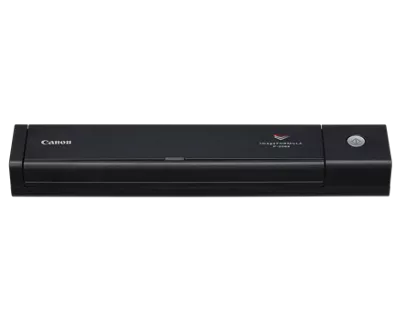
The Canon imageFORMULA P-208II Scan-tini is an earlier personal sheet-fed scanner, not a portable printer accessory or a flatbed. Canon's U.S. page names the model P-208II and gives a 1.3-pound body measuring 1.5 × 12.3 × 2.2 inches with the feed tray closed. The useful trade is compactness and a single USB cable in exchange for a 10-sheet automatic feeder. It fits brief scanning sessions better than a desk-clearing archive project.
There is a status wrinkle: the exact Canon page shows an “In Stock” label alongside “Discontinued” and “no longer available” text. I treat that as an earlier model and do not use either display as a live seller, price or stock signal. The SKU field on the current Canon page reads P-208II; Canon's legacy catalog and U.S. brochure also show 9704B007AB and 9704B007 for the same P-208II configuration. They share the same exact product identity and scanner specifications, not a separate feature variant.
USB is the base operating plan
The scanner draws power over USB when connected to a computer, so the ordinary route is simple: connect it to a compatible host, open Canon's CaptureOnTouch or the built-in CaptureOnTouch Lite mode, and scan to a file or a supported computer-side destination. Canon also lists Windows ISIS/TWAIN software and a Mac TWAIN driver, which is useful when a desktop capture system requires a driver rather than a standalone PDF utility. The support page shows legacy OS-specific downloads; a buyer should verify the actual driver, operating-system build and capture program before relying on a used or older machine.
Canon rates the P-208II at up to 8 pages per minute simplex and 16 images per minute duplex across its listed color, grayscale and black-and-white modes. Those are manufacturer figures under stated test conditions, not timing from an independent workflow test. Resolution is specified up to 600 dpi. Real throughput includes opening the application, checking images, OCR, saving and moving papers; it should not be estimated from the headline rate alone.
A ten-sheet load is not a twenty-sheet load
Canon specifies up to 10 plain-paper sheets per ADF loading, with originals from 2 to 8.5 inches wide and 2.8 to 14 inches long in the U.S. specification. The manual says to fan and straighten pages, keep the stack within the guide marks, and reduce the load if double-feeding occurs. Both sides can be captured in one pass, but automatic duplex does not make this a larger office feeder. If a required minimum is 20 sheets, the P-208II does not meet it; two smaller loads are not the same capability.
Plastic cards are a model-specific nuance. Canon's manual tells the operator to scan cards one at a time through the normal feed inlet. It does not show the separate card slot that appears on the P-215II. The manual's card routine and “automatic or manual” product wording should not be inflated into a dedicated manual-feed mechanism for envelopes or folded originals. Embossed cards may also fail to reproduce cleanly depending on the embossing. If you need an alternate path for unusual papers, inspect that exact item's handling procedure rather than assuming the word “portable” means versatile.
Wireless means adding a different piece of equipment
The P-208II's base interface is USB 2.0; the scanner does not contain a built-in Wi-Fi radio. Its exact manual documents an optional WU10 wireless unit and battery pack, which can provide a separate wireless arrangement. Canon lists CaptureOnTouch Mobile for the model, and Canon's app guidance describes scanning from a compatible mobile device and handing the image to another application. That can create a phone-assisted route, including a cloud app on the device, but it requires the WU10 hardware, compatible software, a working network, a supported phone/tablet and any third-party account. It is not a scanner-only direct cloud connection, and the accessory is absent from the U.S. base-box list.
Before choosing it for travel, confirm the exact WU10 package and current app support. Canon's documents describe older operating-system versions; they do not by themselves establish that the current phone or desktop system still supports every part of the workflow. This check is especially important for a discontinued scanner, where a listing for the machine alone may not include the wireless adapter, battery pack or carrier case.
Where the P-208II makes sense
It is a reasonable candidate for occasional two-sided documents, receipts or supported cards when the user values a compact, USB-powered body and can work in small stacks. It is less suitable for a shared intake station, larger batches, a hard 20-sheet capacity requirement, a guaranteed current mobile workflow, or special originals that need a dedicated second path. Canon's 100-scan daily-volume figure is a suggestion from its specification, not a durability test or evidence that every paper type can be processed at that rate.
The P-215II is the more capable adjacent model: Canon lists twice the plain-paper ADF capacity, faster monochrome/grayscale ratings, a separate card slot and a 39.4-inch long-document mode. It is also heavier and has its own package and optional-WU10 checks. For a current-reference comparison, the Canon R10 Red has a 20-sheet duplex feeder and a dedicated card slot, but its documented connection is USB-only and its own manual limits special-card handling. Those differences matter more than the shared “portable” label.
Check a specific used or remaining unit
Verify the P-208II label, included USB cable, feed guides and current host support; do not assume a resale package contains the WU10, battery or case. Ask whether the rollers and separation pad need service and inspect the unit's feed path, especially if it will scan mixed receipts or cards. Canon's conflicting page labels mean the buyer must verify the actual seller, condition, return terms and accessories. This is a research-based assessment from Canon documents, not a hands-on test or an offer claim.
Canon source documents
Primary references read: Canon's exact U.S. product page, P-208II support page, English user manual and U.S. brochure. The manual and brochure were retrieved and read locally. Direct product/support HTML retrieval returned HTTP 403; those failed bodies are retained, and the official browser pages were inspected. Canon's CaptureOnTouch Mobile information lists this model and explains the app-mediated mobile route.
Key specifications
Key details at a glance
| Scanner class | Portable one-sheet sheet-fed scanner |
|---|---|
| Manufacturer-listed simplex rate | 8 ppm |
| Manufacturer-listed duplex image rate | 16 ipm |
| Automatic document feeder capacity | 10 sheets |
| Optical resolution | 600 dpi |
| Connection options | USB / Wi-Fi |
| Automatic duplex capture | Yes |
| Separate manual-feed route | No |
| Touchscreen | No |
| TWAIN driver documented | Yes |
Use the exact model’s instructions for operating limits, supplied equipment and version differences.
Sources for this review
Sources for this assessment
Compare the workflow before you choose
Use the finder to test your connection, paper and software requirements against the documented scanner arrangements.