
Your needs, this model
Does it fit your priorities?
What does the P-215II add over a 10-sheet portable scanner?
Canon specifies a 20-sheet plain-paper ADF, up to 15 ppm/30 ipm in monochrome or grayscale, a separate one-card-at-a-time slot and Long Document Mode up to 39.4 inches. The optional WU10 is needed for Wi-Fi/mobile use; the base package is USB-oriented.
Explore this need in the finder →Can its card path replace an ordinary manual-feed scanner?
Only for the documented card task. The P-215II's dedicated slot feeds supported plastic cards separately from the ADF, one at a time, when the tray is empty. That does not establish envelopes, folded pages or other special originals, so check the exact original and instructions.
Explore this need in the finder →What should I check on a used P-215II that is not recognized over USB?
Compare the serial number with Canon's limited cable service notice (GY3C5661–GY3C6505) and confirm whether the supplied USB cable has been replaced if the unit has the described recognition/power issue. The notice is not a blanket recall; also inspect the cable, rollers, package and current host support.
Explore this need in the finder →The heavier portable model with a more useful paper path
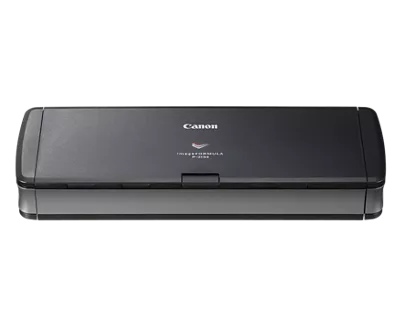
The Canon imageFORMULA P-215II is a compact, computer-powered duplex feeder with a larger paper capacity and more specialized card handling than the P-208II. Canon specifies a 20-sheet plain-paper ADF, 2.2-pound weight and a closed size of 1.6 × 11.0 × 3.7 inches. It still travels easily compared with a desktop feeder, but it is not the lightest option in the P-series. Its additional two-sided load and separate card slot are the reasons to consider it over the 10-sheet P-208II—not a promise of a production-class duty cycle.
Canon's exact U.S. product page names SKU P-215II, but displays both an “In Stock” label and discontinued/no-longer-available language. This assessment therefore treats it as an earlier model and makes no current seller, price or availability claim. The official page's contradictory status is a reason to verify the offered unit and package rather than infer orderability from a listing label.
Use the feeder for paper and a separate slot for cards
The main ADF holds up to 20 plain-paper sheets under Canon's stated conditions and captures both sides. Canon publishes up to 15 ppm/30 ipm for black-and-white and grayscale, while color is rated up to 10 ppm/20 ipm. The resolution specification reaches 600 dpi. These are manufacturer figures: mode, resolution, host performance, application and power arrangement affect actual throughput, and color has a lower rated maximum than monochrome.
The P-215II differs materially from the P-208II at the card path. Its manual identifies a separate card slot with guides, and explains that it accepts a card one at a time while the ADF tray is empty. The card slot is not a second paper feeder and cannot be used at the same time as an ADF stack. Embossed cards may behave differently depending on the embossing. This is a useful, documented special-original route for supported plastic cards, but it should not be generalized to envelopes, folded pages or every item that a broad “manual feed” label might suggest.
Canon lists ordinary lengths up to 14 inches and a separate Long Document Mode up to 39.4 inches. The user must enable that mode in the scanner utility, and the workflow depends on suitable drivers and application behavior. A long original still needs clear input/output space; it is not the same as a sheet that can simply be loaded alongside the normal batch.
USB power and performance trade-offs
The basic route is USB to a computer. Canon lists USB 2.0 and USB 3.0, and the manual explains that the device is bus-powered. A USB 3.0 connection can supply the current needed for the fast one-cable arrangement. With USB 2.0, the manual says a supplemental power cable or separately sold AC adapter can be used for higher-speed operation. The scanner supports USB 3.0 bus power, but the manual says its data-transfer rate remains USB 2.0; the interface label should not be read as a USB 3.0 data-throughput claim.
Canon lists Windows ISIS/TWAIN and Mac TWAIN drivers, along with CaptureOnTouch and built-in CaptureOnTouch Lite. That offers both a bundled desktop route and a driver for compatible capture applications. Check the exact application and host operating system: the listed Windows/macOS versions are legacy entries, and an old support table does not prove current compatibility with a newly updated computer.
Wi-Fi and phone capture require the optional WU10
The P-215II is not Wi-Fi-ready from its base USB connection alone. Canon's manual and brochure describe the separate WU10 wireless adapter and battery pack as the wireless route; the base-box list does not establish that the WU10 is included. With the accessory, Canon describes wireless computer and mobile-device use through CaptureOnTouch Mobile. Canon's mobile-app guidance describes a scan sent from the app to another destination application, which can support a phone-mediated route to a cloud app. The WU10, a compatible iOS/Android device, the app, a working network and any destination account all need separate checking. This is not proof of direct scanner-to-cloud service or universal compatibility with a particular phone.
That difference can change a buying decision. If USB-to-computer scanning is enough, the P-215II is a simple wired model and the optional wireless pieces need not be part of the plan. If phone operation is essential, budget and verify the exact WU10 accessory package before comparing it with a scanner whose Wi-Fi is built in. Do not select this model on the basis of “mobile” in its name alone.
A limited USB cable service notice
Canon posted a service notice for some P-215II units that may fail to turn on or be recognized because of a faulty USB cable. The notice limits the affected range to serial numbers GY3C5661 through GY3C6505 and offers cable replacement for units in that range that experience the described issue. It is not a blanket recall of every P-215II. If evaluating a used unit, check its serial number and whether the problem occurred or the cable was replaced; also inspect the USB lead and test the actual scanner/host combination. The service notice matters particularly because the routine USB cable is the base model's primary connection and power path.
Who should compare it with the P-208II?
For a small bag and very occasional scans, the P-208II is lighter and holds 10 sheets, but cards use the normal feed inlet rather than a dedicated slot. The P-215II increases the plain-paper load to 20, offers a dedicated card slot and adds the longer 39.4-inch mode; it is a bit heavier and its USB 2.0 high-speed setup can require supplemental power. Both can use the optional WU10 wireless arrangement, so neither base package should be mistaken for a built-in Wi-Fi scanner.
The current-reference Canon R10 offers another 20-sheet portable duplex comparison with a separate card slot, while its reviewed plan is USB-only. That is a more recent product line, but it still does not supply the P-215II's documented optional WU10 route. If card capture is rare and the machine stays beside one computer, a simpler USB model may be enough. If a specific phone workflow matters, compare the actual accessory and supported app requirements, not just the scanner's headline capabilities.
Check the exact unit and package
Confirm the model label, USB cable, included setup materials, power accessory and feed condition. The WU10 and battery pack, supplemental power cable, AC adapter and carrying case are not presumed to be included. Check rollers, separation pad, card-slot action, long-document support and driver availability for the intended operating system. For serials in Canon's notice range, compare the cable condition and notice instructions. Because Canon's page combines conflicting availability messages, confirm seller, condition, return rights and warranty in the specific offer. This is a source-based assessment; no physical unit was tested and no current offer is asserted.
Canon source documents
Primary references read: Canon's exact U.S. product page, P-215II support page, English user manual, U.S. brochure, CaptureOnTouch Mobile information and Canon's limited USB-cable service notice. The manual and brochure were retrieved and read locally. Direct product/support/notice retrieval returned HTTP 403; those failed bodies are retained, and the official pages were inspected in browser views.
Key specifications
Key details at a glance
| Scanner class | Portable one-sheet sheet-fed scanner |
|---|---|
| Manufacturer-listed simplex rate | 15 ppm |
| Manufacturer-listed duplex image rate | 30 ipm |
| Automatic document feeder capacity | 20 sheets |
| Optical resolution | 600 dpi |
| Connection options | USB / Wi-Fi |
| Automatic duplex capture | Yes |
| Separate manual-feed route | Yes |
| Touchscreen | No |
| TWAIN driver documented | Yes |
Use the exact model’s instructions for operating limits, supplied equipment and version differences.
Sources for this review
Sources for this assessment
- Canon U.S.A.: imageFORMULA P-215II Mobile Document Scanner
- Canon Support for imageFORMULA P-215II Mobile Document Scanner
- Canon imageFORMULA P-215II User Manual (English PDF)
- Canon U.S.A.: imageFORMULA P-215II Mobile Document Scanner brochure
- Canon CaptureOnTouch Mobile: wireless mobile scanning
- Canon U.S.A.: Service Notice for P-215II scanner-not-recognized errors
Compare the workflow before you choose
Use the finder to test your connection, paper and software requirements against the documented scanner arrangements.