
Your needs, this model
Does it fit your priorities?
Can I send a scan to cloud storage without leaving a computer connected?
Yes, the exact ES-C380W guide lists a Cloud control-panel destination; the scanner can send to a previously registered Epson Connect destination without a computer attached at scan time. Set up Epson Connect and the wireless/network route first, and verify that the required destination and account are supported.
Explore this need in the finder →Does the 20-sheet feeder number apply to every stock?
No. Epson specifies 20 sheets at 21 lb (80 g/m²), then lists 18 sheets at 24 lb, 15 at 28 lb and 12 at 34 lb for the stated path. Receipts, cards, booklets and passports have different path and per-item rules; do not treat 20 as a universal mixed-stack or daily-volume figure.
Explore this need in the finder →Is there a separate route for occasional passports or booklets?
The guide documents a straight-path position for supported one-at-a-time originals. Small A5 booklets and passports must meet the 5 mm limit; thicker passports require a compatible optional passport carrier sheet. This is a special feed path, not a second batch feeder or a guarantee that fragile artwork can be loaded directly.
Explore this need in the finder →Can it satisfy both touchscreen and TWAIN needs while keeping USB and Wi-Fi choices?
Epson identifies a 2.4-inch touchscreen and lists a TWAIN Driver for the ES-C380W in its current compact scanner category; the product page lists USB and wireless connectivity. Check current driver availability for the target host and the exact TWAIN application's support matrix before relying on this combination.
Explore this need in the finder →A compact feeder with more than one scan destination
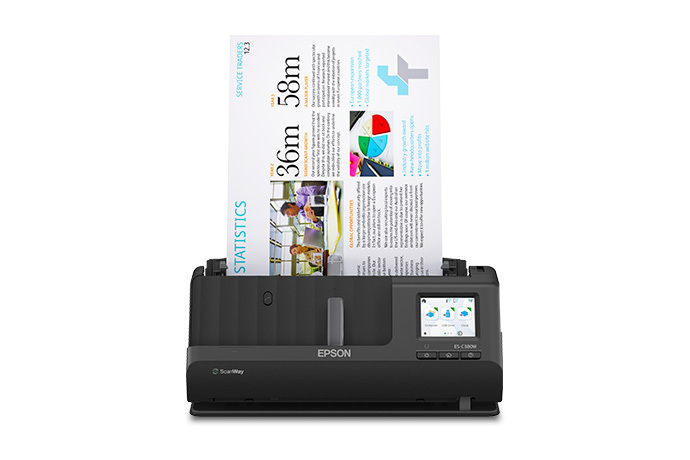
The WorkForce ES-C380W is a small desktop document scanner built around a 20-sheet automatic document feeder. Epson lists USB and Wi-Fi, one-pass duplex capture, a 2.4-inch color touchscreen, mobile scanning and a ScanWay panel workflow. The exact U.S. product page identifies base model B11B269201. This assessment covers that scanner configuration—not a renewed offer, a particular seller package, or any optional carrier sheet or service plan.
The practical case is modest batches in a space-constrained office where people may send work to a computer, a phone, a USB storage device or a previously configured cloud destination. Its appeal is routing flexibility, not high-capacity unattended processing. The manual lists a body about 11.7 inches wide and 4.2 pounds, but the scanner occupies more depth in its straight-path position than in its normal vertical-path stance. Allow room for both positions and for sheets to enter and exit.
Twenty sheets is a real boundary, not a daily-volume promise
Epson specifies a 20-sheet ADF load at 21 lb (80 g/m²). The guide reduces the permitted stack to 18 sheets at 24 lb, 15 at 28 lb and 12 at 34 lb in the listed vertical-path table. Receipts, cards, envelopes, large folded sheets and other originals have separate format, weight and feed-position limits. A 20-sheet rating therefore describes a specific load, not every mixed stack and not the amount the scanner can safely process in a day.
The scanner captures both sides in one pass. Epson rates it up to 30 pages per minute and 60 images per minute, a manufacturer figure rather than an independent measurement or a complete job time. Loading, blank-page decisions, OCR, file naming, destination setup and checking the resulting images still take time. If a routine begins with several dozen loose pages each time, a 20-sheet load means more handling than the 50-sheet ES-400 II or 100-sheet ES-590W assessments. Those larger models make different tradeoffs in connection and software routes; a larger feeder alone is not a reason to ignore whether the destination and originals fit.
The straight path is useful, but it is not a second batch tray
The C380W has a vertical path for ordinary sheets and a straight-path position for certain special originals. Epson's guide gives one-at-a-time procedures for A5 booklets under 5 mm thick and passports under 5 mm thick. A thicker passport needs the compatible optional passport carrier sheet. Those specifics make the straight path a genuine alternative for occasional supported originals, but they do not turn the machine into a flatbed or authorize feeding every fragile item directly.
The same manual separately limits plastic and laminated cards, receipts and folded originals. It warns against directly feeding several materials, including photos, wet-ink or glued sheets, transparencies, carbon-backed originals, sticky notes and heavily damaged paper; specified carrier-sheet jobs need a separately obtained accessory. For a passport, booklet or valuable page, follow the model's loading sequence and inspect the result before putting the original away. The Smart Panel route also does not support every document type—the guide specifically excludes booklet scanning through that app—so mobile convenience should not be assumed to replace every host-software procedure.
USB, mobile, cloud and TWAIN are different routes
For a computer-owned workflow, the unit supports USB, and the guide lists Hi-Speed USB 2.0 Type-C. For wireless tasks, the manual documents Wi-Fi and Wi-Fi Direct as well as Epson Smart Panel scanning from iOS or Android. The panel can also save a scan directly to a user-supplied USB storage device. Epson's instructions require that drive to use FAT, FAT32 or exFAT, cap it at 2 TB, and exclude password-protected, encrypted or driver-dependent devices.
The Cloud selection on the touchscreen is a separate scanner-to-service route: the owner must first register the product with Epson Connect and select a destination. Once configured, the scan can be sent without a computer attached at scan time, but it still depends on the network, internet and the registered account/service. This is not the same as scanning by USB and uploading from ScanSmart on a host. It is also not a promise that every cloud provider or business account can be used. For long originals, route choice matters: the guide permits up to 220 inches through the computer method at its specified resolutions, while control-panel network, email, cloud and USB destinations have a 36-inch ceiling and Smart Panel does not support long paper.
Epson's current U.S. compact-scanner listing names a TWAIN driver for the ES-C380W. That is relevant when capture software requires TWAIN, but the category label is not a compatibility guarantee for a particular operating system, driver release or third-party program. Check Epson's current download for the host you use and the application vendor's supported matrix. Likewise, OCR features in Epson ScanSmart may help create searchable files, but they do not remove the need to verify recognition, page order and destination.
Where it sits among other Epson choices
The ES-C380W combines USB and Wi-Fi with a touchscreen and scanner-side destinations in a compact 20-sheet format. The assessed ES-590W keeps Wi-Fi and a touchscreen but has a 100-sheet ADF; its review also explains that cloud sending depends on destination setup and that paper stock changes capacity. The USB-only ES-400 II has a 50-sheet load and included TWAIN, but not a documented mobile or computer-free cloud route. These are meaningful workflow differences, not a ranking based on unverified speed tests.
The C380W is worth comparing when you want small batches, two-sided capture and several possible destinations without dedicating desk space to a larger office feeder. It is a weaker fit when the routine repeatedly starts with large stacks, needs verified enterprise software support, or relies on scanning long sheets directly from the panel or phone app. Before choosing, confirm the exact base SKU and current package condition, the appropriate USB/Wi-Fi setup, the TWAIN/application combination, the cloud destination registration requirements, and whether any optional carrier sheet is needed for the originals you handle.
Key specifications
Key details at a glance
| Scanner class | Compact desktop document scanner |
|---|---|
| Manufacturer-listed simplex rate | 30 ppm |
| Manufacturer-listed duplex image rate | 60 ipm |
| Automatic document feeder capacity | 20 sheets |
| Optical resolution | 600 dpi |
| Connection options | USB / Wi-Fi |
| Automatic duplex capture | Yes |
| Separate manual-feed route | Yes |
| Touchscreen | Yes |
| TWAIN driver documented | Yes |
Use the exact model’s instructions for operating limits, supplied equipment and version differences.
Sources for this review
Sources for this assessment
Compare the workflow before you choose
Use the finder to test your connection, paper and software requirements against the documented scanner arrangements.