
Your needs, this model
Does it fit your priorities?
Can the ADS-2800W send a scan to a web service without a computer?
After setup, Brother's ADS-2800W/ADS-3600W guide describes Scan to Web/Web Connect as uploading to supported Internet services without a computer at scan time. The exact Web Connect Guide says initial access setup requires an Internet-connected computer and the scanner needs wired or wireless Internet; a service account is required, provider offerings can change, and extra purchases may apply. This is a documented route, not confirmation of a particular current service/account.
Explore this need in the finder →Does the ADS-2800W support mobile scanning over Wi-Fi?
Yes, the exact product page lists Brother iPrint&Scan mobile compatibility, and Brother's model-applicable guide says mobile scanning from the machine works over a Wi-Fi network. Check the current app, device operating system, wireless setup and destination before relying on it; this is not a phone compatibility test.
Explore this need in the finder →Can it fit an earlier-model setup requiring duplex, TWAIN and a 50-sheet load?
The exact U.S. page lists duplex scanning and TWAIN, while Brother's support specification rates the ADF up to 50 pages on 20 lb (80 g/m²) Legal paper or within a 5 mm stack limit. It therefore reaches a 50-sheet minimum on that stated basis, but not 60 sheets. Do not treat 50 as a limit for long paper, cards, mixed stocks or daily throughput; check the exact host driver too.
Explore this need in the finder →Does it provide a separate manual-feed route for one-off originals?
No distinct general manual-feed inlet or separately selected manual-feed mode is established in the exact sources. Brother does document plastic-card settings and carrier sheets within the ADF workflow, but those procedures do not establish the separate occasional-original route this finder asks for.
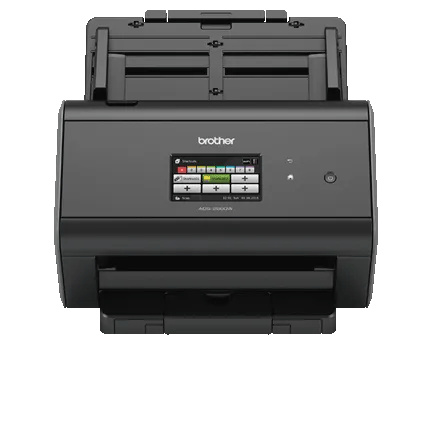
Explore this need in the finder →The ADS-2800W is a discontinued workgroup ADF scanner with automatic two-sided capture, a shortcut touchscreen, and USB, Ethernet or Wi-Fi. Brother also documents mobile and Web Connect paths that can send work to some destinations without a desktop computer. This is a research-based assessment of specifications and guides, not a hands-on test or a statement that an old unit is currently available.
A 50-sheet duplex feeder, with conditions
Brother rates the machine for up to 40 pages per minute and lists up to 80 duplex images per minute. Its page says the duplex speed is measured with advanced features off, Letter-size originals and 300 dpi. Those ceilings help compare the design; they are not measured throughput for a real batch with OCR, file naming, image cleanup, network transfer and verification included.
The ADF's 50-page maximum is qualified: Brother's U.S. support specification states 20 lb (80 g/m²) Legal paper or a stack below 0.2 inch (5 mm). The shared user guide gives a smaller 40-page load for long-paper mode, a five-card ceiling in plastic-card mode and one page when using a carrier sheet. Treating every stock and mode as a 50-sheet load would be misleading. Receipts, thin or uneven originals, photos, cards and folded documents have their own preparation guidance; the guide recommends carrier-sheet handling for several of those cases.
Duplex is a documented automatic scanning capability, not an extra tray or a way around paper limits. If a routine regularly alternates fragile, thick or unusual pages with ordinary office stock, the standard ADF may require more preparation than a dedicated special-original mode. The ADS-2800W product page lists card handling but the inspected manual does not establish a separate general manual-feed inlet or selected manual-feed mode. A carrier sheet or card setting should not be mistaken for that distinct route.
USB, Wi-Fi and Ethernet are different setups
At a desk, Hi-Speed USB 2.0 provides a direct computer connection. Brother lists TWAIN and other scan-driver interfaces, and the model-applicable guide describes TWAIN capture from Windows and Macintosh applications. That is useful for existing capture software, but a driver name alone cannot prove compatibility with a particular current operating system, application version or managed workstation. Brother's support page shows current download selectors separately from its older detailed compatibility tables; confirm the exact driver package and test the intended application before sourcing a used unit.
The other arrangement is a networked scanner. Brother's product page lists Ethernet and wireless interfaces, while the support specification assigns Wi-Fi infrastructure/ad-hoc and Wi-Fi Direct to this model. That can support shared destinations and setup flexibility, but wired Ethernet is not built-in Wi-Fi and neither connection guarantees access through an organization's security policy. The guide includes network configuration, authentication and security controls; an office with managed Wi-Fi or directory services should involve its administrator rather than assuming setup is plug-and-play.
For mobile capture, Brother lists iPrint&Scan and says a wireless network is required. The guide specifically qualifies mobile scanning for the ADS-2800W and ADS-3600W, but this is not proof of compatibility with a current phone, app version or destination. Check the present app requirements and network arrangement.
Touchscreen shortcuts and computer-free destinations
The 3.7-inch color touchscreen and 48 programmable shortcuts may help a shared desk when users repeatedly choose a small set of profiles. Brother's guide shows on-device shortcuts for supported scan routes, including Web Connect. Once configured, Scan to Web uploads without a computer at scan time. Initial Web Connect access setup is different: Brother requires an Internet-connected computer with its full driver/software package to apply for service access, then the service account is registered on the scanner.
Web Connect is not a universal guarantee: Brother requires Internet access and a service account, says additional purchase may apply, and warns that supported services can change. The scanner can reach Internet services over wired or wireless networking, but organizations may limit outbound connections. The product page also lists network-folder, FTP/SFTP, SharePoint and USB-flash destinations, each with separate setup requirements; a flash drive is not listed as included. Confirm the exact service you intend to use.
Where this model fits in the earlier Brother line
Compared with the reviewed ADS-2700W, the ADS-2800W has the same broad 50-sheet workgroup idea and 3.7-inch touchscreen, but its inspected guide establishes direct Web Connect service access. The ADS-2700W's guide does not establish that same scanner-side cloud path. The ADS-2500W is another touchscreen/Web Connect alternative with its own package and support limits. These are adjacent models, not interchangeable identities; choose by the exact route and software support you need.
The current-reference ADS-4300N is a different trade: an 80-sheet wired USB/Ethernet scanner whose manual documents Manual Single Mode, but it does not offer this model's touchscreen or built-in Wi-Fi. The ADS-2800W makes more sense on paper where wireless setup, mobile scanning or configured Web Connect matters more than a larger feeder or a separate special-original mode. Its rated daily duty figure is 6,000 pages, but Brother describes that as a comparison of designed durability; it is not a tested work quota.
What to verify before considering an older unit
Brother labels its exact U.S. ADS2800W page discontinued and out of stock. That does not prove every reseller has none, but it is not evidence of current stock, condition or seller warranty. Inspect the offered unit, power supply, cable, carrier sheet, driver media and written return terms; the page's displayed price is not treated as a current quote.
Check the model marking, firmware and driver package, host OS, TWAIN application, network security and intended Web Connect account. Confirm the one-time computer-based service setup, current provider support, and that originals fit the mode-specific feeder limits; a separate manual-feed route is not established. Brother's U.S. product/support pages, model-applicable User's, Network User's and Web Connect Guides, and current downloads page inform this assessment; they do not test a used unit, app, account or office network.
Key specifications
Key details at a glance
| Scanner class | Professional desktop sheet-fed scanner |
|---|---|
| Manufacturer-listed simplex rate | 40 ppm |
| Manufacturer-listed duplex image rate | 80 ipm |
| Automatic document feeder capacity | 50 sheets |
| Optical resolution | 600 dpi |
| Connection options | USB / Wi-Fi / Wi-Fi Direct / Ethernet |
| Automatic duplex capture | Yes |
| Separate manual-feed route | No |
| Touchscreen | Yes |
| TWAIN driver documented | Yes |
Use the exact model’s instructions for operating limits, supplied equipment and version differences.
Sources for this review
Sources for this assessment
- Brother ADS2800W U.S. product page
- Brother U.S. ADS-2800W support specifications
- Brother U.S. ADS-2800W manuals index
- Brother ADS-2400N / ADS-2800W / ADS-3000N / ADS-3600W User's Guide
- Brother Web Connect Guide for ADS-2800W / ADS-3600W
- Brother ADS-2400N / ADS-2800W / ADS-3000N / ADS-3600W Network User's Guide
- Brother U.S. ADS-2800W downloads and current operating-system selectors
Compare the workflow before you choose
Use the finder to test your connection, paper and software requirements against the documented scanner arrangements.