
Your needs, this model
Does it fit your priorities?
Can the ES-60W scan from a phone or tablet without a computer beside it?
Yes, Epson documents Smart Panel scans from compatible iOS/Android devices over the product network or direct Wi-Fi. The app does not support carrier-sheet, long-paper or long-receipt scans.
Explore this need in the finder →Can it send files to cloud storage with no computer in the workflow?
Epson ties cloud sending to ScanSmart on a connected Windows PC or Mac; the phone app guide documents scanning and saving to a mobile device, not a computer-free cloud service.
Explore this need in the finder →Can it capture a two-sided 20-sheet stack without reloading?
No. Epson specifies simplex capture and one sheet of paper capacity, so this model cannot meet a 20-sheet automatic-feeder minimum.
Explore this need in the finder →Can a TWAIN desktop app request scans from it?
Epson lists an included TWAIN driver. Confirm the current exact-model driver and the application’s operating-system/version requirements first.
Explore this need in the finder →What the ES-60W is built to do
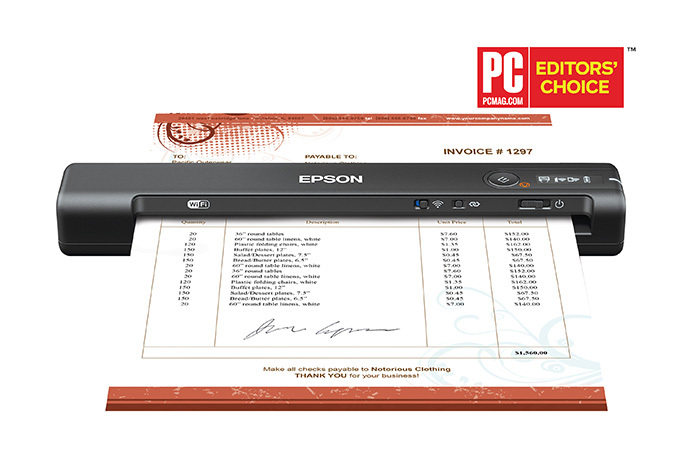
The Epson WorkForce ES-60W (U.S. model B11B253201) is a portable, single-sheet scanner for a very different job from a desktop ADF. Its practical attraction is that one small scanner can connect to a computer by USB or reach a compatible phone or computer over Wi-Fi. It also has a rechargeable battery. Those conveniences reduce the need to keep a laptop connected for every mobile capture, but they do not turn the ES-60W into a stack-fed or two-sided office scanner.
Epson’s specification calls it a sheet-feed simplex scanner and gives it a one-sheet paper capacity. The “Automatic Feeding Mode” can append successive sheets to one file as each is inserted; it does not mean that a hopper holds a pile of pages and feeds them unattended. For a receipt, signed form or isolated page, that is a straightforward match. For a recurring stack of two-sided forms, an archive project, or a shared intake desk, loading each sheet and handling the reverse side separately is the central limitation, not a small footnote. The manufacturer’s 15-page-per-minute figure and up-to-four-seconds-per-page claim are specific single-sheet ratings at 300 dpi on Letter paper; they are not independent results or a promise of complete OCR-and-filing time.
Two connections, but one active route at a time
The exact U.S. model lists USB and wireless connectivity. Epson’s user guide makes an important distinction: USB and network connections cannot be used simultaneously. A computer can use the wired USB route, or the scanner can use Wi-Fi; “both” therefore means two possible setups for different circumstances, not simultaneous connections or multiple independent scanners inside one housing.
In wireless use, Epson documents Smart Panel scanning from compatible iOS or Android devices over a local network and direct Wi-Fi. The phone or tablet is part of the scan workflow, which is useful when a computer is not the natural destination for a field document. Compatibility still depends on the mobile device, app version and setup, so verify them before relying on this route. The ES-60W’s modest LCD reports wireless and battery status. It is not a touchscreen for choosing a scan profile; its controls are physical buttons and switches.
Wireless does not automatically mean computer-free cloud delivery. Epson’s product page ties its cloud claim to ScanSmart software on a connected Windows PC or Mac with Internet access. The guide’s Smart Panel instructions describe scanning and saving to the mobile device, not a model-specific direct-to-cloud destination. Treat a phone scan and a desktop ScanSmart upload as distinct workflows rather than assuming that one feature list proves both.
Paper handling is narrow by design
The input is one original at a time. The manual also specifies one plastic ID card or one receipt at a time, with thickness and paper-weight restrictions. For example, Epson’s guide limits an embossed ID-1 card to 1.24 mm and warns that even some thin laminated cards may not scan successfully. These are constraints to inspect before feeding a valuable original, not a claim that every card or receipt is safe for the path.
The scanner can accommodate long documents, with the stated maximum changing at higher resolution. The phone app has a further boundary: Epson says Smart Panel does not support carrier-sheet scans or long papers and long receipts. A compatible carrier sheet is a separately identified accessory for certain originals; it is not an additional feeder or evidence that a specific seller includes one. Keep a replaceable sample page for setup, and use the paper and software route that matches the manual’s limits.
There is no separate manual-feed channel in the reviewed configuration. The fact that a person inserts each page by hand, or that the same slot accepts supported cards, does not create a second alternate feed path. If the buyer’s special-original routine depends on a distinct manual feed, compare the exact route in a model such as the ES-C220 or another individually reviewed scanner rather than inferring it from the ES-60W’s portable slot.
Software, OCR and battery details
Epson lists ScanSmart, Epson Scan 2, Nuance OCR and an included TWAIN driver. The stated output options include searchable PDFs and editable Office files. OCR can make text searchable, but a created text layer is not proof that names, totals or small type were recognized correctly. Review the scan and verify fields that matter. A TWAIN listing is useful if an existing capture program requires that interface, but it does not guarantee that a particular program, managed computer or current operating-system version supports the available driver. Check Epson’s exact-model downloads and the application vendor’s requirements together.
The rechargeable Li-ion battery adds a real mobile option: the guide specifies roughly 300 scans under one stated condition—continuous automatic feeding at 300 dpi color over Wi-Fi—and about three and a half hours to charge using USB 2.0 with the scanner off. Those are manufacturer conditions, not a measured day-in-the-field result; resolution, color and connection choices affect actual use. Epson lists a 0.66 lb body measuring 10.7 by 1.9 by 1.4 inches. The small size and battery are the reason to consider the ES-60W, not evidence of high-volume throughput.
Who should compare it—and what to verify
Consider the ES-60W when portability, wireless transfer to a compatible phone and one-page capture outweigh duplexing and stack capacity. The cheaper-complexity alternative is the similarly sized ES-50, which is USB-powered and has no Wi-Fi or battery. The larger desktop ES-C320W is a different class: it has an ADF and automatic duplex, so do not treat that model’s stack workflow as a feature of the ES-60W. For comparison across connection and feeder choices, use the connection guide and paper-handling guide.
Before buying, confirm that the exact label is B11B253201, inspect the actual seller condition and return terms, and check the current operating-system and application matrix. Confirm the phone app and the exact originals you plan to scan; verify whether a carrier sheet is required and included; and decide whether a computer-based ScanSmart cloud route is acceptable. No independent speed, OCR-accuracy, jam-rate, durability or image-quality test was conducted for this assessment. The evidence supports a carefully bounded portable workflow—not a claim that the scanner will perform every paper-handling task.
Key specifications
Key details at a glance
| Scanner class | Portable one-sheet sheet-fed scanner |
|---|---|
| Manufacturer-listed simplex rate | 15 ppm |
| Automatic document feeder capacity | 1 sheets |
| Optical resolution | 600 dpi |
| Connection options | USB / Wi-Fi |
| Automatic duplex capture | No |
| Separate manual-feed route | No |
| Touchscreen | No |
| TWAIN driver documented | Yes |
Use the exact model’s instructions for operating limits, supplied equipment and version differences.
Sources for this review
Sources for this assessment
Compare the workflow before you choose
Use the finder to test your connection, paper and software requirements against the documented scanner arrangements.