
Your needs, this model
Does it fit your priorities?
Is the ES-865 a Wi-Fi or mobile scanner?
The reviewed B11B250202 configuration lists SuperSpeed USB 3.0 as standard connectivity, and its exact guide describes scanning through Epson ScanSmart on a connected computer. Epson does not document a phone/tablet route for this standalone configuration. The ES-500W II is a different Epson model when Wi-Fi and Smart Panel matter; do not carry that model's routes across to the ES-865.
Explore this need in the finder →Does its color LCD satisfy a touchscreen profile-selection requirement?
No. Epson describes a color LCD with push buttons, and the guide shows physical navigation and select buttons. That gives the ES-865 an on-device display but does not establish touch operation or a touchscreen profile picker.
Explore this need in the finder →What does the 100-sheet capacity mean?
The guide specifies up to 100 Letter sheets at 21 lb (80 g/m²), 86 A4 sheets at 24 lb (90 g/m²), and 80 Legal sheets at 21 lb. Heavier paper and other formats have lower or different limits. Treat the 100-sheet number as an exact paper-specific one-load ceiling, not a daily count or a mixed-stack promise.
Explore this need in the finder →Can the ES-865 send scans to cloud storage without a computer?
That route is not documented. Epson's product-page note requires ScanSmart on a connected Windows PC or Mac, and the exact guide sends the scan from that software after review and account sign-in. Cloud destinations do not make the USB scanner computer-free.
Explore this need in the finder →Does the exact model include TWAIN?
Epson lists an included TWAIN driver, which is useful where capture software specifically requires it. Confirm the current driver and the target program's host/version requirements; the manufacturer's inclusion statement is not a guarantee for every TWAIN application.
Explore this need in the finder →Is there a separate manual-feed route for occasional special originals?
The exact guide describes loading through the ES-865 input tray/ADF, but it does not establish the separate special-original feed path used by this finder's manual-feed requirement. An optional flatbed scanner dock is a different accessory and scanning surface, not proof of a separate manual-feed inlet or of what a seller includes.
Explore this need in the finder →A 100-sheet feeder, with a paper-specific limit
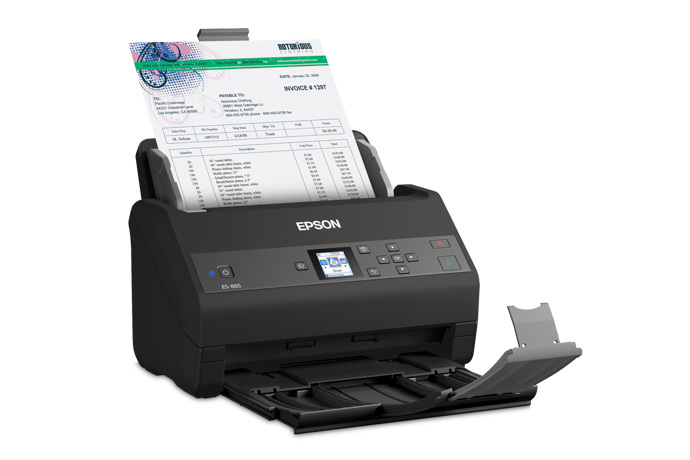
The U.S. WorkForce ES-865 (B11B250202) is a color, sheet-fed scanner with one-pass duplex capture and a 100-sheet feeder. That maximum has a defined basis: Epson's English guide lists 100 Letter sheets at 21 lb (80 g/m²), 86 A4 sheets at 24 lb (90 g/m²), 74 A5 sheets at 28 lb (104 g/m²), and 80 Legal sheets at 21 lb. It gives further lower limits for heavier stock. The figure describes one load under the named paper conditions, not a daily volume or an unrestricted mix of media.
Rated speed depends on resolution
Epson rates the ES-865 at up to 65 pages per minute / 130 images per minute for Letter-size originals at 200 or 300 dpi in black-and-white, color or gray. The U.S. specifications list 16 ppm / 32 ipm at 400 or 600 dpi. These are manufacturer ratings; the job still includes feeding, reviewing pages, naming files, OCR, choosing a destination and checking the saved result. Epson also lists a 7,000-sheet peak daily duty cycle, but says that figure is calculated from maximum speed and assumed daily use time. It is not an independent endurance test or a promise for every paper and workflow.
USB and a host computer own the standard scan path
The product page lists SuperSpeed USB 3.0 as standard connectivity. Epson's manual describes a connected computer and its ScanSmart/Scan 2 software; it does not document built-in Wi-Fi or a phone/tablet scanning route for this standalone configuration. A color LCD and cloud option should not be mistaken for network hardware. When Wi-Fi or mobile capture is a must, compare the distinct ES-500W II, not a neighboring model name.
Cloud sending has a separate host condition. Epson's product footnote requires ScanSmart installed on a connected Windows PC or Mac, and the guide's send procedure starts after a scan is reviewed in that software and the user signs in to an account. That makes cloud a computer-led output route, not scanner-to-cloud operation with no computer at scan time. Check the current driver, software and managed-network requirements for the intended host.
A display, but not a touchscreen
Epson lists a color LCD and physical buttons. In the guide, arrows, OK, start, stop, home and back controls navigate the on-device display. The evidence supports a panel display with buttons, not touch operation or a touchscreen profile chooser. This is an important difference from the Wi-Fi-capable ES-590W, whose touchscreen is part of its own Wi-Fi destination workflow.
Epson lists an included TWAIN driver, plus Scan 2 and ScanSmart. That can suit a computer capture workflow whose software explicitly requires TWAIN, but a listed driver is not a compatibility guarantee for every operating system, application version or managed workstation. Confirm both the Epson driver matrix and the capture software owner's support requirements before making the interface a hard requirement.
Special originals need their own loading decision
The guide specifies how to load supported mixed sizes and paper types, plastic and laminated cards, business cards, folded pages and long originals. It also cautions against directly feeding various vulnerable or unsuitable materials—including photos, valuable originals, artwork, wet-ink, torn or curled sheets, bound pages, staples or clips, carbon-backed paper, transparencies, glossy stock, labels and adhesive. Some delicate, folded or irregular documents can use an optional carrier sheet within the guide's limits; that accessory is not established as part of every seller's package.
Long paper reaches 240 inches only under progressively tighter resolution limits: the guide allows up to 600 dpi through 53 inches, 300 dpi through 215 inches and 200 dpi through 240 inches. Supporting a long original also requires the specified setup and assistance as the sheet enters and exits. It is not a full-resolution promise at the maximum length.
Optional flatbed equipment is not the standard package
Epson's guide has a section for an optional flatbed scanner dock. It describes the dock as separate equipment and specifies an additional Epson Perfection V19 scanner for that arrangement. A dock can add a glass-based path for suitable originals, but neither its presence nor the V19 should be inferred from the ES-865 model name or a body photograph. Check the exact seller's package before relying on that route. The dock is also not the same thing as a separate manual-feed path through the ADF.
Where it sits among the Epson desktop options
Compared with the 50-sheet ES-400 II and ES-500W II, the ES-865 is the faster, larger-feeder profile on Epson's published 65/130 and 100-sheet figures. The trade is a less flexible standard connection: the ES-400 II and ES-865 are USB-focused, while the ES-500W II adds Wi-Fi and Smart Panel but remains at 50 sheets and 35/70 rated speed. The ES-590W also has a 100-sheet headline, Wi-Fi and a touchscreen cloud route, whereas the ES-865's documented cloud send uses host ScanSmart. A larger number or screen does not erase those workflow differences.
Who should keep it on a shortlist
The ES-865 merits a closer look for a computer-centered office that values duplex batch capture, a 100-sheet Letter/80 g/m² loading basis, a color control-panel display and included TWAIN. It is a weaker fit if the required setup depends on built-in Wi-Fi, a phone/tablet scan route, a touchscreen, a separately documented special-original feed path, or computer-free cloud upload. Before choosing a particular offer, confirm model B11B250202, paper-size and weight limits, current host/software compatibility, accessory and carrier-sheet requirements, exact package contents and seller terms. This review interprets Epson documentation; it is not a report of ownership, hands-on use, measured results, current stock or price.
Key specifications
Key details at a glance
| Scanner class | Professional desktop sheet-fed scanner |
|---|---|
| Manufacturer-listed simplex rate | 65 ppm |
| Manufacturer-listed duplex image rate | 130 ipm |
| Automatic document feeder capacity | 100 sheets |
| Optical resolution | 600 dpi |
| Connection options | USB |
| Automatic duplex capture | Yes |
| Separate manual-feed route | No |
| Touchscreen | No |
| TWAIN driver documented | Yes |
Use the exact model’s instructions for operating limits, supplied equipment and version differences.
Sources for this review
Sources for this assessment
Compare the workflow before you choose
Use the finder to test your connection, paper and software requirements against the documented scanner arrangements.