
Your needs, this model
Does it fit your priorities?
Can the RR-400W scan both sides of a loaded stack automatically?
Yes, Epson identifies one-pass duplex capture and a 20-sheet ADF. The 20-sheet figure is based on standard stock and one loading; the guide lists smaller counts for heavier paper, and the feed should not be treated as a mixed-stock or daily duty guarantee.
Explore this need in the finder →Can I scan to a phone and cloud without a computer?
Epson documents a Wi-Fi Smart Panel route that can save a scan to a compatible mobile device or cloud service. This is an app-mediated route, not a scanner touchscreen. For receipt data extraction, Epson says the mobile-app receipts must be imported to ScanSmart Accounting Edition on a connected Windows PC or Mac.
Explore this need in the finder →Does the RR-400W have a separate manual path for special originals?
Yes, its guide distinguishes vertical and straight paper paths. The straight path feeds selected thick, long, card, envelope or passport jobs one at a time; passport and irregular originals require compatible carriers. It is not another batch tray or a blanket permission to feed delicate originals directly.
Explore this need in the finder →What happens when the ADF minimum rises above 20 sheets?
The documented standard-load ceiling is 20 sheets at 80 g/m²; the guide lists 18 at 90, 15 at 104 and 12 at 127 g/m². It meets a 20-sheet question only on the appropriate stock and fails a 30-sheet minimum. Special originals in straight-path mode load one at a time.
Explore this need in the finder →Assessment: The Epson RapidReceipt RR-400W (U.S. part B11B270202) sits between a portable one-sheet scanner and a larger departmental feeder. Its key combination is a 20-sheet, one-pass duplex path, USB and Wi-Fi, plus an alternate paper path for selected special originals. It is more versatile than the small RR-70W, but it is still a compact desktop feeder with a modest loading limit, not a high-volume workgroup machine. This is a document-based assessment of Epson's sources, not a hands-on test.
A compact feeder with a real but small batch limit
Epson lists a 20-sheet ADF and up to 30 pages per minute / 60 images per minute. The rate is qualified for Letter-size originals at 300 dpi over USB in black-and-white, grayscale, or color. It is a manufacturer condition, not a measured promise for receipt extraction, duplex review, OCR corrections, or cloud delivery. The manual rates the 20-sheet standard stack at 80 g/m² and lists lower capacities for heavier paper: 18 sheets at 90 g/m², 15 at 104 g/m², and 12 at 127 g/m². That makes “20 pages” a useful starting point, not a universal capacity for every stock or a daily-duty figure.
The duplex mechanism captures both faces in one pass, which matters more than the advertised speed if forms and invoices are printed on both sides. A simplex portable such as the RR-70W makes the operator handle the back separately; the RR-400W's ADF is better suited to recurring small stacks. At the other end, Epson's RR-600W and RR-620W have 100-sheet feeders and are more appropriate when reloading every 20 pages would interrupt the routine. The RR-400W's smaller footprint is not a substitute for a larger feeder when daily volume is high.
USB, wireless, phone and cloud are not one feature
The exact product page identifies USB and Wi-Fi. They support different arrangements: a computer can scan through USB or a network, while Epson Smart Panel offers a separate phone/tablet workflow. The guide warns that a USB connection takes priority when another computer is attached, so do not plan on both connections serving the scanner simultaneously. Epson's support page names RR-400W as compatible with Smart Panel on iOS and Android. A phone can scan over Wi-Fi; the app requires setup and a supported device, and app functionality is narrower than the scanner's full host-computer range.
For this model, the computer-free-cloud answer is more than a generic Wi-Fi inference. Epson's RR-400W manual says Smart Panel scans can be saved to a mobile device or cloud service. That is an app-mediated route, not a touchscreen sending directly from the scanner. There is an important catch for the financial workflow that gives RapidReceipt its name: Epson says receipts scanned in the mobile app must be imported to ScanSmart Accounting Edition on a connected Windows PC or Mac for data extraction. The mobile route can move an image, but that does not mean receipt parsing and the entire accounting workflow run on the phone.
The model also lacks the RR-600W/RR-620W's color touchscreen. Its buttons and indicator lights are a simpler panel; wireless destination selection happens through the app and software. Epson lists TWAIN-compliant application support in the RR-400W FAQ and provides Epson Scan 2 as a driver, but the FAQ is not a guarantee for a particular present-day OS or capture application. If TWAIN is mandatory, verify the exact driver build and host software before relying on it.
Two paper paths, with constraints
The selectable vertical path is intended for receipts and ordinary multiple-sheet feeding. The straight path handles supported thick, long, folded, irregular, card, envelope and passport originals one at a time, with front ejection. This is a genuine special-original route, but it is neither another batch tray nor permission to load every delicate sheet bare. Epson requires a compatible passport carrier sheet for passports; a carrier sheet is also the prescribed protection for certain irregular or delicate originals. These accessories are not assumed to be in every package.
Epson's manual permits long paper up to 120 inches at 50–300 dpi, with a maximum scan width of 8.5 inches. Long sheets need support at both the input and output, and Smart Panel does not support originals over 15.5 inches. Receipt loading is specified for 2–8.5-inch widths, 2–120-inch lengths and 53–77 g/m² stock; the vertical-path stack is constrained by a 2.4-mm thickness limit, while straight-path receipts are loaded individually. The guide warns against direct scanning of photos, items with wet ink or glue, staples/clips, loose sticky notes and other excluded types. Glossy, thermal, wrinkled or coated stock can also be troublesome. Read the exact media table before assuming that a special receipt, ID card or folded page is suitable.
The chassis measures 11.7 by 4.1 by 4.9 inches in vertical position and 11.7 by 5.0 by 4.7 inches in straight-path position; Epson notes that projections are excluded. The straight path needs practical front clearance for output, so those dimensions alone do not define the working space. The listed weight is about 4 lb. The scanner is a desktop unit, not the untethered carry option represented by the RR-70W.
Who should choose it?
The RR-400W fits a small office or home-business routine with regular two-sided forms, batches that fit within a paper-appropriate 20-sheet load, and a useful choice between computer capture and a mobile app. Its straight path can also cover occasional supported special originals, provided the operator follows the one-at-a-time instructions and has any required carrier sheet. It is less suitable for stacks that regularly exceed 20 sheets, delicate originals that cannot tolerate feeder handling, a workflow that expects app-based receipt extraction without a desktop, or someone who wants touchscreen destination controls.
Before purchase, distinguish the base part B11B270202 from the Certified ReNew suffix B11B270202-N described below; compare what is actually included, since the base offer's box contents and optional carrier accessory are not assumed here. Check the phone and computer operating-system support, current app behavior, the intended cloud service, paper weights and load size, and the space needed for front ejection. Epson's RR-400W support page and model-qualified guide are better final authorities than a generic comparison chart. This scanner earns consideration for its combination of duplex, Wi-Fi/app use, and special-path flexibility; its limits are straightforward enough that those capabilities should not be mistaken for a larger feeder, a touchscreen, or an all-mobile accounting system.
Certified ReNew RR-400W: scanner capability versus offer condition
Epson separately lists the RR-400W as Certified ReNew under part B11B270202-N. The U.S. product page describes the same RR-400W model, retains the 20-sheet ADF and duplex/wireless receipt workflow, and distinguishes this suffix as a renewed offer rather than documenting a different scanner revision. The exact listing displayed an out-of-stock notice when checked on November 1, 2026; availability can change, and the base model's status should not be transferred to this offer.
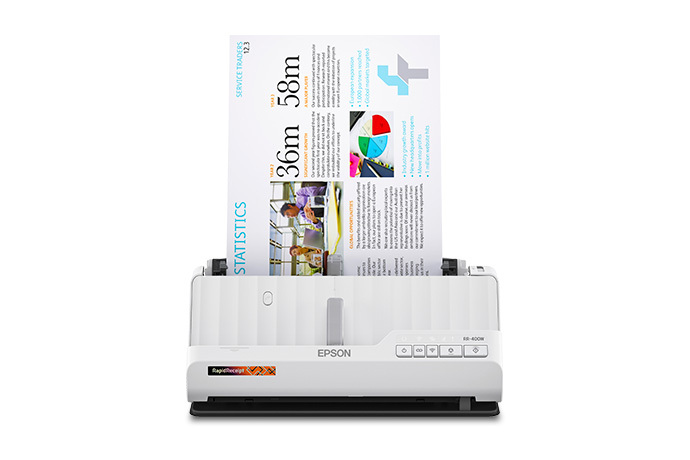
This exact renewed listing advertises a 30-day return policy and a one-year limited warranty. Those are offer-level terms, unlike the scanner capabilities in the main review; read the current policy for exclusions and verify that the checkout page still attaches them to B11B270202-N. Epson's product page summarizes included receipt/PDF software but does not provide a complete carton checklist, so verify the supplied cable, paper guides, carriers, and any other accessories rather than assuming that a new retail box is reproduced. The official RR-400W body image above is a scanner image, not a photo of the renewed unit or its contents. Sources: Epson's exact RR-400W Certified ReNew listing and Certified ReNew program announcement.
Key specifications
Key details at a glance
| Scanner class | Desktop sheet fed document scanner |
|---|---|
| Manufacturer-listed simplex rate | 30 ppm |
| Manufacturer-listed duplex image rate | 60 ipm |
| Automatic document feeder capacity | 20 sheets |
| Optical resolution | 600 dpi |
| Connection options | USB / Wi-Fi |
| Automatic duplex capture | Yes |
| Separate manual-feed route | Yes |
| Touchscreen | No |
| TWAIN driver documented | Yes |
Use the exact model’s instructions for operating limits, supplied equipment and version differences.
Sources for this review
Sources for this assessment
- Epson U.S. Receipt Scanners catalogue, RR-70W and RR-400W cards
- Epson U.S. RapidReceipt RR-400W exact product page, B11B270202
- Epson U.S. RR-400W support and Smart Panel route, SPT_B11B270202
- Epson ES-C220/ES-C320W/RR-400W U.S. User's Guide, selected English sections
- Epson RR-400W support FAQ about TWAIN-compliant applications
- Epson RR-400W exact product-gallery image, front-feed view
Compare the workflow before you choose
Use the finder to test your connection, paper and software requirements against the documented scanner arrangements.