
Your needs, this model
Does it fit your priorities?
Can the RR-70W scan to a phone without a computer?
Yes, in the documented Wi-Fi arrangement. Epson's RR-70W guide describes Smart Panel scanning from the scanner to an iOS or Android device. The app excludes long originals, long receipts and carrier-sheet jobs; confirm your phone's current compatibility before relying on it.
Explore this need in the finder →Does RR-70W have automatic duplex or a stack ADF?
No. Epson describes one-sheet paper capacity and a simplex imaging path. Automatic Feeding Mode means placing each next sheet in the same input slot, not loading a multi-page stack; a second side needs a separate pass.
Explore this need in the finder →Will the RR-70W send cloud scans directly without a computer?
That route is not established by the model-specific guide. Epson's exact page ties cloud scanning to ScanSmart on a connected Windows PC or Mac, while its phone procedure describes scanning to a Smart Panel device. Do not treat Wi-Fi or phone capture alone as proof of a direct cloud path.
Explore this need in the finder →Does Epson document a TWAIN driver for an existing host workflow?
Epson's RapidReceipt announcement lists RR-70W among scanners supplied with a TWAIN driver. That supports a driver-level claim, not compatibility with every current operating system or capture application; verify the exact host combination.
Explore this need in the finder →Assessment: The Epson RapidReceipt RR-70W is a small, one-page-at-a-time scanner for a mobile or paper-light routine, not a miniature office ADF. Its strongest case is the combination of USB and wireless setups with battery operation and a documented phone/tablet workflow. Its defining compromise is equally important: the scanner is simplex, the paper capacity is one sheet, and the Wi-Fi/mobile route is narrower than a computer-based scan. This is a source-led assessment of Epson documentation, not a hands-on test.
Portable means individual sheets, not a stack
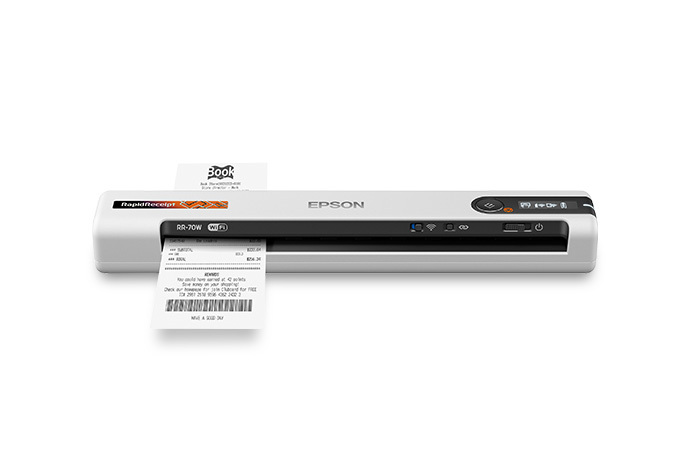
Epson describes the RR-70W (U.S. part B11B253205) as a portable sheet-feed scanner with a one-sheet capacity and a simplex imaging path. The 15-page-per-minute headline is a manufacturer figure for one Letter-size sheet at 300 dpi on battery power; it should not be read as an independent test of receipts, OCR, file review, or the time needed to sort expense records. Optical resolution is listed at 600 dpi. These facts make it a plausible companion for a small number of receipts, forms, or business cards, but a poor fit if the routine is feeding a pile and walking away. A long stack still means repeated insertions.
The same qualification applies to duplex. The RR-70W does not automatically capture both sides in one pass. If an original has two printed sides, the operator must handle the second side separately. The one-sheet inlet is also not a separate manual-feed mechanism. Epson's guide permits particular envelopes and irregular originals, but one-at-a-time handling through the same slot is not a general special-media bypass. Fragile sheets, photos, sticky notes, staples and other excluded originals need careful review against the model-specific loading instructions.
Two connections, two different jobs
Unlike USB-only RR-60 (B11B252204), the RR-70W lists USB and Wi-Fi. They are alternative setups: the RR-70W guide says USB and network connections cannot be used simultaneously. A computer-connected workflow can use Epson's scanning software and the included TWAIN driver Epson names in its RapidReceipt announcement. That is useful if a desktop capture application already expects TWAIN, but it does not promise compatibility with every current operating system, TWAIN host, or application version. Check the support page for the exact host before choosing the scanner around an integration requirement.
The wireless option has a real phone use case. Epson's RR-70W guide describes connecting a networked scanner to the Smart Panel app on a compatible iOS or Android device. A battery and a Wi-Fi arrangement can avoid the tethered-computer setup in places where carrying a laptop is inconvenient. The guide also narrows what the phone app can do: it does not support long paper, long receipts, or carrier-sheet scans. For those originals, the supported computer software path is the more appropriate route.
Cloud language on the product page needs a finer distinction. Epson's feature copy mentions cloud destinations, but its footnote ties cloud scanning to ScanSmart on a connected Windows PC or Mac; the RR-70W-specific manual documents Smart Panel scanning to the mobile device, not a scanner-side direct-cloud destination. This assessment therefore does not classify it as a computer-free cloud scanner. Wi-Fi, phone capture, and direct cloud delivery are different capabilities. Buyers who require a cloud upload without a computer should verify the exact current mobile-app workflow with Epson instead of inferring it from a broad headline.
Paper limits matter more than the long-page headline
The manual allows a document up to 8.5 by 72 inches, but that maximum is not available at every setting: Epson limits documents over 14 inches to 50–300 dpi, while documents scanned at 301 dpi or higher are limited to 8.5 by 14 inches. Receipt stock has its own conditions: one receipt at a time, between 2 and 8.5 inches wide, up to 72 inches long, and 14–20 lb (53–77 g/m²). These boundaries are useful if invoices or receipts vary greatly in length. They do not turn this model into a high-volume ledger scanner, and the phone app cannot scan the long examples at the top of the range.
Epson lists the RR-70W at 10.7 by 1.9 by 1.4 inches and about 0.7 lb. The battery is specified as lithium-ion with a rated 1,140 mAh capacity; Epson estimates about 300 continuous-feed scans at 300 dpi color over Wi-Fi on a full charge. That number is a manufacturer estimate under stated conditions, not a promise of real-world runtime after sleep, setup, or varied paper types. The scanner can also be used over USB, so buyers should decide which power and connection arrangement they need and check the exact package contents rather than assuming a cable, carrier sheet, or other accessory is included.
Where it fits in the RapidReceipt range
The RR-70W is the sensible middle ground between the simpler, USB-only, no-mobile RR-60 and the desktop feeders. If wireless mobile capture is the priority but paper arrives one document at a time, the RR-70W's Wi-Fi route is a meaningful difference. If the workload is multi-page stacks, compare the RR-400W, which adds a 20-sheet duplex feeder and a second path for special originals, or the RR-600W and RR-620W, whose 100-sheet feeders and touchscreens serve larger batches. Those larger machines occupy desk space and are not substitutes for this battery-powered portable workflow.
The RR-70W is worth considering when portability, a limited paper stream, TWAIN host support, and optional Smart Panel capture matter more than duplex or stacked feeding. It is a weak fit for a scanning queue, frequent two-sided forms, hands-off batch intake, or a must-have scanner-to-cloud route with no computer. Confirm the exact B11B253205 configuration, app compatibility, paper limits, cable/power arrangement, and included accessories before choosing an offer. A separate, discontinued Value Edition package, B11B253205VE, is described below; its software claims should not be transferred to the current base offer. Epson's RR-70W support page and RR-60/RR-70W guide are the useful final checks.
Discontinued Value Edition: a software-package distinction
Epson's exact U.S. Value Edition page identifies RR-70W part B11B253205VE and marks that configuration discontinued. It describes the same mobile, single-sheet-fed RR-70W family, not a stack ADF or automatic-duplex variant. The published distinction is the bundled software: the page names ScanSmart for receipt/invoice organization and specifically lists Kofax Power PDF, NewSoft Presto! BizCard and Presto! PageManager. That package matters if those applications are part of an existing desktop routine, but the page does not establish license duration, current operating-system compatibility, transfer rights or software-support lifetime. Verify those details rather than treating an old bundle name as a current software entitlement.
The Value Edition page also does not establish that the base B11B253205 retail package contains the same three named applications, nor does it publish a complete accessory/cable checklist here. Keep the package distinction separate from the shared RR-70W scanner assessment above: one sheet at a time, simplex capture and the same model-specific USB/Wi-Fi/app caveats. The official indexed model page marks this package discontinued. When checked on November 1, 2026, a direct request to the former Value Edition path redirected to Epson's general receipt-scanner page; this is a historical observed configuration, not a presently purchasable offer. Sources: Epson's RR-70W Value Edition page and its base RR-70W page.
Key specifications
Key details at a glance
| Scanner class | Portable one-sheet sheet-fed scanner |
|---|---|
| Manufacturer-listed simplex rate | 15 ppm |
| Automatic document feeder capacity | 1 sheets |
| Optical resolution | 600 dpi |
| Connection options | USB / Wi-Fi |
| Automatic duplex capture | No |
| Separate manual-feed route | No |
| Touchscreen | No |
| TWAIN driver documented | Yes |
Use the exact model’s instructions for operating limits, supplied equipment and version differences.
Sources for this review
Sources for this assessment
- Epson U.S. Receipt Scanners catalogue, RR-70W and RR-400W cards
- Epson U.S. RapidReceipt RR-70W exact product page, B11B253205
- Epson U.S. RR-70W support page, SPT_B11B253205
- Epson RR-60/RR-70W User's Guide, selected model-qualified pages
- Epson RapidReceipt U.S. announcement, RR-70W TWAIN statement
- Epson RR-70W exact product-gallery image, model label and receipt
Compare the workflow before you choose
Use the finder to test your connection, paper and software requirements against the documented scanner arrangements.